This problem is that some pins show pulled up but always read zero, specifically pin P8_11, 12, 15 and P8_18
I can use P8_14 as an example,
sudo gpioget -b pull-up -c /dev/gpiochip3 26
“26”=inactive
this should read high, correct?
sudo gpioget -b pull-down -c /dev/gpiochip3 26
“26”=inactive
It’s like some pins do not have an internal pull-up resistor. What am I doing wrong here?
That does feel a little strange, I agree,
but when comparing to your first post, I’d say you’re making strides.
In case you haven’t tried it yet, could you tie that P8_14 pin high through a 1K resistor?
That should tell us if the pin is actually doing GPIO, function 7.
(just covering all the bases)
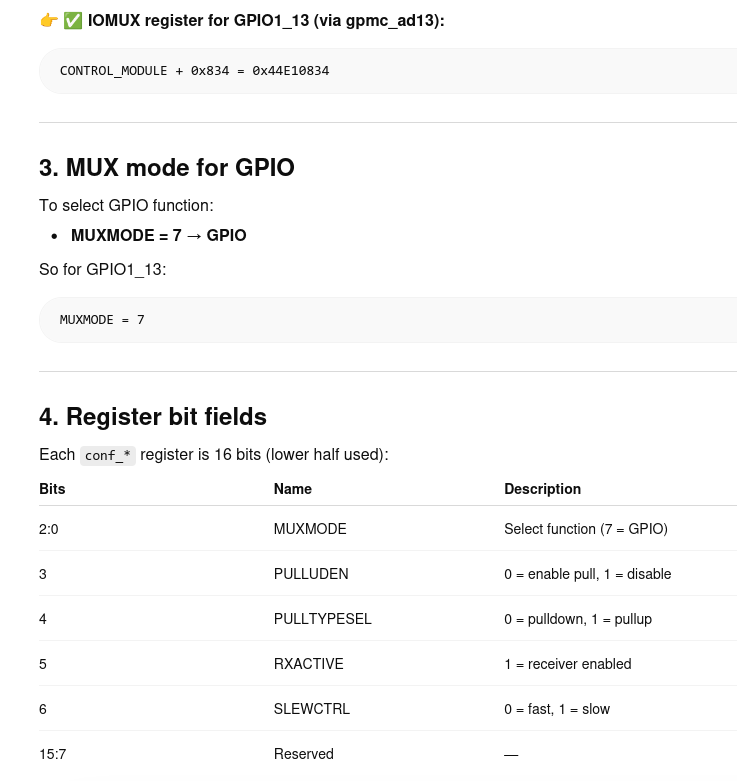
You can also check the IOMUX register with devmem2 to make sure
everything checks out.
I tried devmem2 to read and write the control module memory address, something in the kernel is resetting the register. Here is another example for pin P9_27
sudo gpiomon -b pull-up -c /dev/gpiochip2 19
sudo gpioinfo|grep P9_27
line 19: “P9_27” input bias=pull-up edges=both consumer=“gpiomon”
clearly gpiomon has ownership of the pin and is pulling it high. when pin P9 27 is measured with a volt meter you get zero volts. The pull-up function is not working. Some pins are pulled up with the default reboot settings.
Yes, well, it’s saying it’s pulled up, but that doesn’t necessarily mean that it is.
Hence why I wanted you to post the value.
I’m guessing the control register is being altered by libgpiod;
not by something in the kernel.
You can check this by looking at a pin which isn’t currently consumed by anything.
Instead of jumping about all the pins, can we stick to one and have that work?
Furthermore, I still don’t know if you tried that external pull-up to check
if you can get anything but 0 when using gpioget…
Okay, let’s stick to pin P8_11. Its a pin that I want to use with an internal pull up.
gpioinfo|grep P8_11
gpiochip0 - 32 lines:
line 13: “P8_11” input
no external pullup applied to P8_11
gpioget -b pull-up -c /dev/gpiochip0 13
“13”=inactive
add a 10K ohm pull up resistor to P8_11 via 3.3VDC
gpioget -b pull-up -c /dev/gpiochip0 13
“13”=active
gpiomon -b pull-up -c /dev/gpiochip0 13
pulled the 10K ohm pull up resistor
2501.664005880 falling gpiochip0 13 “P8_11”
put 10K ohm resistor back
2548.771266636 rising gpiochip0 13 “P8_11”
Pulled 10K ohm resistor off pin
killed gpiomon
gpioget -b pull-up -c /dev/gpiochip0 13
“13”=inactive
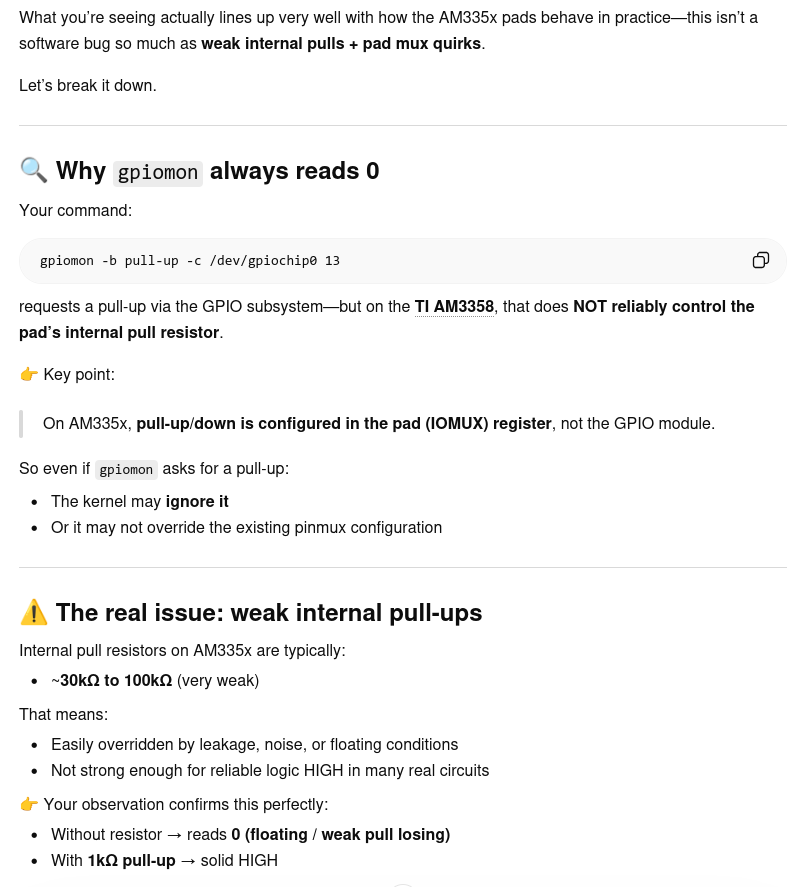
gpioget -b pull-up does not work for this pin. I’m not sure it works for any pin. The pins I’m using were default pulled up at boot.
Yes, there’s a really good chance that what we’re seeing can be applied across the board.
At least it’s consistent. Broken, but consistently so. 
I typed the following into ChatGPT:
I need you to go find the IOMUX register bits for a TI AM3358, specifically the bits and the register address for GPIO1_13.
and out came a wealth of information. I believe it to be correct,
so I would like for you to do some probing with devmem2 at the given address,
both with the system at idle and running gpiomon at the same time
to verify that those expected bits turn up as advertised.
I am especially interested in these values:
Especially bits 3, 4 and 5 are of interest to us.
Please post back the values you find!
This part was particularly interesting:
so depending on your application, you
might not want to depend on the internals.
Annoying, I know, but sometimes one just need to roll with it, move on
and lay down some code. After all, the application is what counts, right?
That being said, I totally understand your sentiment; I’m like that also,
hard to let the details go, because I want to understand what’s going on underneath.
I finally got the pins to pull up, but not in user space!
pinmux |grep P8.11
gpio0:13 | GPMC_AD13 P8.11 | 0x44e10834 | 0x0834 | 0x37 | 7 | FRXPULLUP
pinmux |grep P8.12
gpio0:12 | GPMC_AD12 P8.12 | 0x44e10830 | 0x0830 | 0x37 | 7 | FRXPULLUP
pinmux |grep P8.15
gpio0:15 | GPMC_AD15 P8.15 | 0x44e1083c | 0x083c | 0x37 | 7 | FRXPULLUP
pinmux |grep P8.18
gpio1:1 | GPMC_CLK P8.18 | 0x44e1088c | 0x088c | 0x37 | 7 | FRXPULLUP
and its a total hack job for now, It needs a lot of clean up and some thinking on how to handle this. So any suggestion would be greatly appreciated.
I downloaded the latest kernel from Robert’s github then compiled it with no modifications to make sure it would boot on the BBB. Got that done, then I added a function call in init/main.c right before rest_init. Told you it was a hack.
#ifdef CONFIG_SOC_AM33XX
        bgpioSetPinMux();
#endif
        /* Do the rest non-__init'ed, we're now alive */
        rest_init();
Thanks to Daniel for the hints on the custom kernel.
I notice the newly compiled kernel was significantly smaller in size, I’m not sure why, I’ll make a detailed thread when I get some time.
If your post here is anything to go by, I’d say to went from 0x27 to 0x37,
which means that you finally got those resistors configured correctly.
I’m pretty sure @Daniel_Kulp managed to trim off a lot of “excess fat”
from that kernel build of his, so that doesn’t surprise me.