oivato:
UART1 Tx: P9.24
UART1 Rx: P9.26
”Enable” or RTS pin: P9.19
testing… WIP: BONE-LED-P9-19 · beagleboard/BeagleBoard-DeviceTrees@0f19266 · GitHub
and..
and then.. BONE-LED-P9-19: disable i2c2 node to get P9-19 · beagleboard/BeagleBoard-DeviceTrees@18326d1 · GitHub
voodoo@23-am335x-bbb:~$ sudo beagle-version
eeprom:[A335BNLT0A5C3313BBBK2518]
model:[TI_AM335x_BeagleBone_Black]
dogtag:[BeagleBoard.org Debian Trixie Base Image 2025-08-08]
bootloader:[microSD-(push-button)]:[/dev/mmcblk0]:[U-Boot SPL 2022.04-ge543709d (Jun 27 2025 - 18:09:26 +0000)]:[location: dd MBR]
UBOOT: Booted Device-Tree:[am335x-boneblack-uboot.dts]
UBOOT: Loaded Overlay:[BB-ADC-00A0.kernel]
UBOOT: Loaded Overlay:[BB-BONE-eMMC1-01-00A0.kernel]
UBOOT: Loaded Overlay:[BONE-LED-P9-19.kernel]
kernel:[6.15.11-bone27]
/boot/uEnv.txt Settings:
uboot_overlay_options:[enable_uboot_overlays=1]
uboot_overlay_options:[uboot_overlay_addr1=BONE-LED-P9-19.dtbo]
uboot_overlay_options:[disable_uboot_overlay_video=1]
uboot_overlay_options:[uboot_overlay_pru=AM335X-PRU-UIO-00A0.dtbo]
pkg check: to individually upgrade run: [sudo apt install --only-upgrade <pkg>]
WARNING:pkg:[bb-cape-overlays]:[NOT_INSTALLED]
pkg:[bb-customizations]:[1.20250808.0-0~trixie+20250808]
pkg:[bb-usb-gadgets]:[1.20250523.1-0~trixie+20250527]
pkg:[bb-wl18xx-firmware]:[1.20230703.0-0~trixie+20240703]
pkg:[kmod]:[34.2-2bbbio1~trixie+20250522]
WARNING:pkg:[librobotcontrol]:[NOT_INSTALLED]
cmdline:[console=ttyS0,115200n8 root=/dev/mmcblk0p3 ro rootfstype=ext4 rootwait fsck.repair=yes earlycon coherent_pool=1M net.ifnames=0 lpj=1990656 rng_core.default_quality=100]
dmesg | grep remote
[   16.339486] systemd[1]: Reached target remote-fs.target - Remote File Systems.
[   36.863271] remoteproc remoteproc0: wkup_m3 is available
[   36.983169] remoteproc remoteproc0: powering up wkup_m3
[   37.010356] remoteproc remoteproc0: Booting fw image am335x-pm-firmware.elf, size 217148
[   37.063320] remoteproc remoteproc0: remote processor wkup_m3 is now up
[   52.123191] remoteproc remoteproc1: 4a334000.pru is available
[   52.253347] remoteproc remoteproc2: 4a338000.pru is available
dmesg | grep pru
[   52.123191] remoteproc remoteproc1: 4a334000.pru is available
[   52.253347] remoteproc remoteproc2: 4a338000.pru is available
dmesg | grep pinctrl-single
[    3.510441] pinctrl-single 44e10800.pinmux: 142 pins, size 568
dmesg | grep gpio-of-helper
dmesg | grep wlcore
lsusb
Bus 001 Device 001: ID 1d6b:0002 Linux Foundation 2.0 root hub
lspci
pcilib: Cannot open /proc/bus/pci
lspci: Cannot find any working access method.
END
voodoo@23-am335x-bbb:~$ gpioinfo  | grep P9_19
        line  13:       "P9_19 [i2c2_scl]"      output consumer="P9_19"
git clone -b v6.16.x https://github.com/beagleboard/BeagleBoard-DeviceTrees
cd ./BeagleBoard-DeviceTrees/
make
Updated to v6.16.x to match your kernel
This should work..
voodoo@23-am335x-bbb:~$ echo 0 > /sys/class/leds/P9_19/brightness
voodoo@23-am335x-bbb:~$ echo 1 > /sys/class/leds/P9_19/brightness
1 Like
oivato:
6.16.5-bone16
now i see your on this kernel.. let me sync..
1 Like
oivato
October 6, 2025, 6:53pm
26
I did:
cpp -I /opt/source/dtb-6.16.x/include -P BONE-LED-P9-19.dtso | dtc -@ -I dts -O dtb -b 0 -o BONE-LED-P9-19.dtbo -cp BONE-LED-P9-19.dtbo /lib/firmware/Added in /boot/uEnv.txt: uboot_overlay_addr4=BONE-LED-P9-19.dtb
After the reboot the line was down for the first time - which was a great indicator
oivato
October 6, 2025, 7:00pm
27
Even though P9_19 was off for the first time, my program couldn’t get it up.
LED=P9_19drv=$(readlink -f /sys/class/leds/$LED/device/driver) || truedev=$(basename $(dirname $(readlink -f /sys/class/leds/$LED))) || trueecho “$dev” > “$drv/unbind”
Which unbided the P9_19 from the LED driver.
Then I could switch it on and off with gpioset -z -c /dev/gpiochip3 13=(1 or 0)
Final teste: I restarted my program and
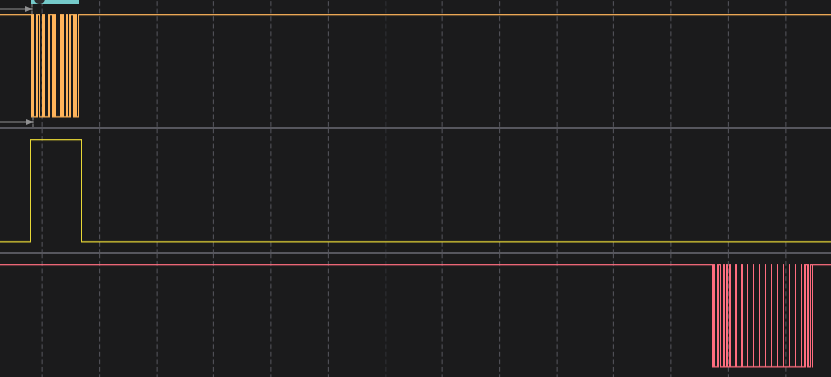
P9_19 (in yellow) worked
@RobertCNelson Is there a way to disasociate the P9_19 from the LEDs driver?
1 Like
So, what your really missing from your current overlay: BeagleBoard-DeviceTrees/src/arm/overlays/BONE-LED-P9-19.dtso at v6.16.x · beagleboard/BeagleBoard-DeviceTrees · GitHub
P9.19/P9.1x: remove pinmux from i2c2: (overlays can’t delete, so we cheat by “appending” empty…)
&i2c2 {
	pinctrl-0 = <>;
	status = "disabled";
};
This free’s up P9.19 for normal use.
In the BONE-LED-P9-19.dtso i tied P9.19 to thru:
	leds {
		pinctrl-names = "default";
		pinctrl-0 = <&bb_gpio_p9_19_pins>;

		compatible = "gpio-leds";

		pin@919 {
			label = "P9_19";
			gpios = <&gpio0 13 GPIO_ACTIVE_HIGH>;
			default-state = "keep";
		};
	};
But really, you could add it to your BB-UART1-00A0 overlay.. It just has to be called from somewhere in am33xx_pinmux…
&am33xx_pinmux {
	pinctrl-names = "default";
	pinctrl-0 = <&rts_p9_19_pins>;

	rts_p9_19_pins: pinmux_rts_p9_19_pins {
		pinctrl-single,pins = <0x17C 0x07>; /* P9_19 as GPIO */
	};
};
2 Likes
@oivato ,
So, every GPIO pin was already claimed somehow and it is hard to believe. Maybe I am taking this initiative wrongly here.
Why could you not already use a GPIO that was available? I am not upset or being ugly to you, I hope.
I just thought, “If she is using a GPIO that is available, then using the P9.19 header pin is not needed.”
In any light, I am glad you guys/gals got it situated and things are working. But like I say, @RobertCNelson is a master of the art/science/whatever of beaglebone in general. This also includes Linux and shell scripting for his achieving ways.
Seth
P.S. @oivato , it is too bad I could not figure it out in time. Good luck!
oivato
October 7, 2025, 11:45am
30
Robert, you binded P9_19 to the LED’s driver, right?
My program isn’t able to togle the pin , unless I unbind it manually through the command line.
Is it possible to bind it to something else?
I want my libgpiod functions to request the output and set it’s value, but right now they see the output as busy when they try to select it.
If it’s possible, how to do it?
oivato
October 7, 2025, 12:09pm
31
Don’t worry, my friend! I apreciate the attention and time you spent trying to help me!
What I understant form this process:
During early boot, each pin comes up with a default mux function; on BeagleBone Black, P9_19 defaults to I²C (I2C2_SCL). Later, device-tree overlays are applied to change pinmux as needed. If the I²C2 controller remains enabled, its driver will keep (or reapply) the I²C pinctrl state, which conflicts with our overlay and prevents P9_19 from staying in GPIO mode. Disabling I²C2 in the overlay frees P9_19 so the new pinmux configuration (GPIO) takes effect.
this should be solved with what i wrote here: Migrating from Debian 10 → 13 broke GPIO switch on P9_19 - #28 by RobertCNelson
update your uart overlay with:
&i2c2 {
	pinctrl-0 = <>;
	status = "disabled";
};
and
&am33xx_pinmux {
	pinctrl-names = "default";
	pinctrl-0 = <&rts_p9_19_pins>;

	rts_p9_19_pins: pinmux_rts_p9_19_pins {
		pinctrl-single,pins = <0x17C 0x07>; /* P9_19 as GPIO */
	};
};
Regards,
 ):
):