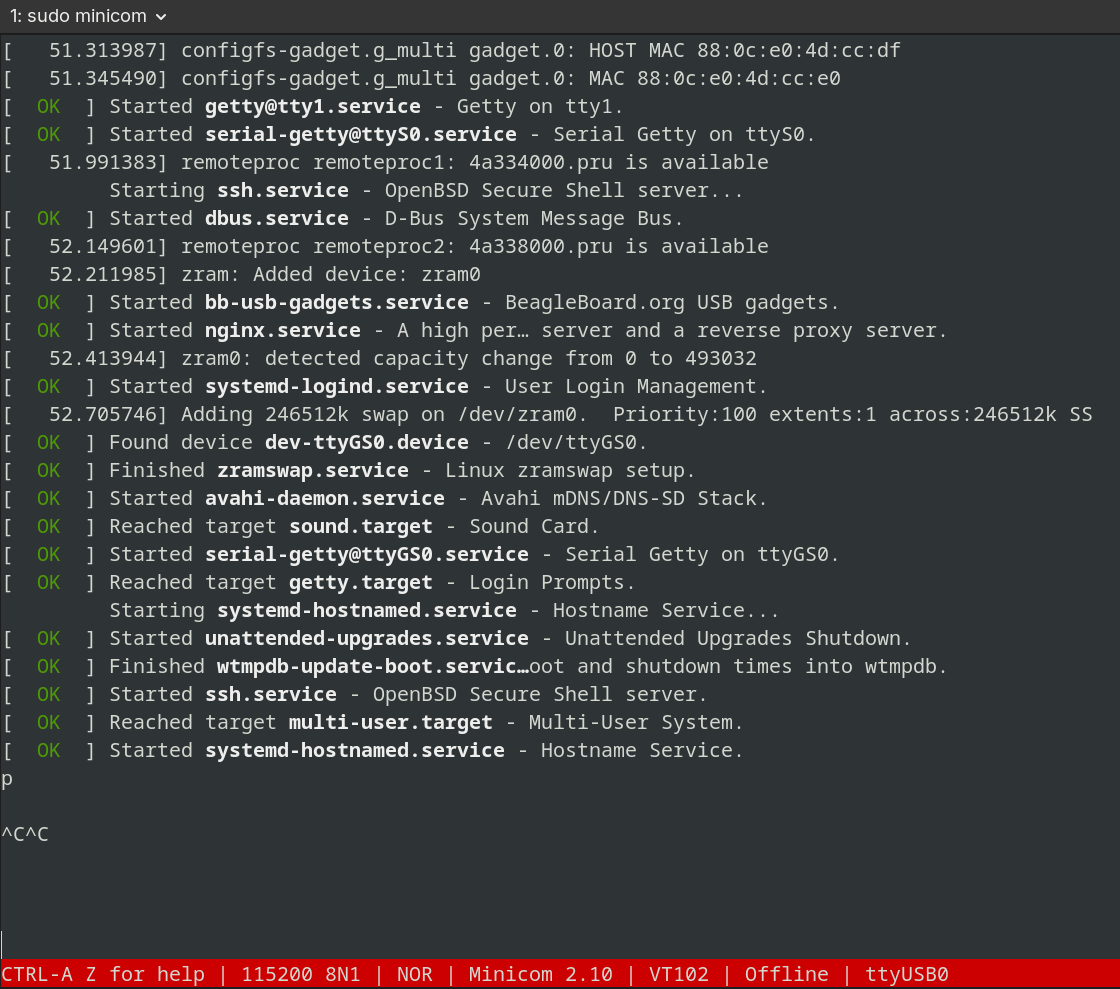
Hi, i have a beaglebone black, in which i have install the compiled kernel in /boot, dtb in /boot/dtbs/$(uname -r)/ and modules in /lib/modules/$(uname -r)/ built using bb.org_defconfig.
but i still booting the BeagleBoard.org Debian Trixie Base Image 2026-03-17, after all services are started but before login prompt appear, it stucks.
i was able to login via ssh but no other way around.
Screen is stuck here.
earlier i installed the kernel built using /boot/config-$(uname -r), i have started seeing the behavior when i made some changes in /boot/dtbs/(earlier installed kernel)/
but didn’t touch the debian installed dtb files.
please tell where i’m going wrong
Odd, iirc works on my image, an arch linux derivative. I think what I did was set up getty to just work on the USB gadget serial interface, then getty sould only run when the device file appears, which is slow given the clunky way that USB gadget comes up.
Iirc, I had several problems with the slow speed of USB gadget coming up, and solution for both serial and ethernet, was just to ensure startup is conditional on the relevant device appearing …
I’m travelling right now, but will post my method when I return.
This sets and address on the ethernet, and the far end can only have one number given by the /30. The setup also runs a DHCP server - run by systemd. This is the reliable way, as it only runs the DHCP server explicitly on usb0 and only when it is brought up (which is slow by the GPS gadget). I also set so all packets are routed via the far end, and DHCP doesn’t sending anything other than an IP number and extent, so doesn’t do NTP/DNS/etc.
On the host machine which is also running linux, I enable IP forwarding via
And also enable a firewall with masquerading, this is needed as 192.168.7.0/24 can’t propagate on the internet. I also configure it to expect ethernet on usb via /etc/systemd/network/enp.network
[Match]
Name=enp*

[Network]
DHCP=yes
For a UART I just bring up acm, and that comes up reliable. On the host machine, I make sure normal users can access by creating the file on the host of /etc/udev/rules.d/50-myusb.rules
Dependencies in systemd dictate the loading of the services. rc.local loads first before the agetty services. I tried to switch these but ran into problems, sudo reboot would hang.
/etc/resetGS0.sc must have an & to go into the background so rc.local exits. After rc.local exits, agetty will load due to systemd dependencies.
[  OK  ] Started rc-local.service - /etc/rc.local Compatibility.
[   77.701771] rc.local[458]: resetGS0 sleeping
[  OK  ] Started getty@tty1.service - Getty on tty1.
[  OK  ] Started serial-getty@ttyGS0.service - Serial Getty on ttyGS0.
[  OK  ] Started serial-getty@ttyS0.service - Serial Getty on ttyS0.
After resetting the serial-getty@ttyGS0.service the login prompt returns.
Lots of sleeping, but seems to work. Moving on and waiting for formal updates to the system.
Seeing the issues with the hardware driver rtw88_8821cu, I just wanted to use wpa_supplicant. I might switch to iwd in the future. One thing at a time.
When to use which: Use iwd if you want faster connections, better power efficiency, or a simpler command-line experience, especially on modern Linux systems. Use wpa_supplicant if you need maximum compatibility with older hardware or specialized, complex network configurations.
Important Note: Do not run iwd and wpa_supplicant at the same time, as they will conflict for control of your wireless hardware.
Looked a bit more into how serial is brought up. This is done via libcomposite the usb gadget set up. This is defined in the file system under /sys/kernel/config/usb_gadget/ now it works on my BBB, which is Arch OS, and I configured usb gadget by hand. I’ve compared my BBB set up (Arch) with my PB2 set up (Debian). I presume BBB (debian) is very similar to PB2 (debian).
Anyway looking at the sys faile structure, debian brings up g_multi/configs/c.1/ffs.mtp and g_multi/functions/ffs.mtp, I didn’t bring this up. The ACM set up seems identical on both.
No real difference in the boot messages. On modules, my arch set up has u_ether usb_f_acm u_serial libcomposite as modules which get loaded, looks like in debian these are in the main kernal. This can make a difference as kernel options are done differently for modules vs compiled in.
Anyway bottom line is I see the usb gadget uart coming up reliably, and not clear whats different with my set up.
My set up on getty is the same on ttyGS0, on both I do serial-getty.
I’ve already compiled the 6.19.13 kernel with my kernel mods. Do I need this image linux-image-6.19.13-bone16 for the other changes to be applied properly?
Interesting. I know I had a delay on starting dhcp until after the usb otg Ethernet had come up. Thought I had the same on the UART, but didn’t think I did it your way. I’ll have to check my configuration to see how I did it. I kind of had in mind that the getty can only start after the device appears p- but I’ll check what I did …
and things are much better, but still get the serial login prompt hanging about every 5 reboots. So there is still some timing issues going on.
Are you able to repeat this on your BBB?
sudo beagle-version
eeprom:[A335BNLTEID02547SBI04226]
model:[TI_AM335x_BeagleBone_Black]
dogtag:[BeagleBoard.org Debian Trixie Base Image 2026-03-17]
bootloader:[microSD-(push-button)]:[/dev/mmcblk0]:[U-Boot SPL 2022.04-g5509547b (Jan 22 2026 - 19:56:08 +0000)]:[location: dd MBR]
bootloader:[eMMC-(default)]:[/dev/mmcblk1]:[U-Boot SPL 2022.04-gc6f4cf7d (Apr 24 2025 - 03:22:59 +0000)]:[location: dd MBR]
UBOOT: Booted Device-Tree:[am335x-boneblack-uboot.dts]
UBOOT: Loaded Overlay:[BB-ADC-00A0.kernel]
UBOOT: Loaded Overlay:[BB-BONE-eMMC1-01-00A0.kernel]
UBOOT: Loaded Overlay:[BB-UART1-00A0.kernel]
UBOOT: Loaded Overlay:[BB-UART2-00A0.kernel]
kernel:[6.19.13-bone16]
/boot/uEnv.txt Settings:
uboot_overlay_options:[enable_uboot_overlays=1]
uboot_overlay_options:[uboot_overlay_addr4=BB-UART1-00A0.dtbo]
uboot_overlay_options:[uboot_overlay_addr5=BB-UART2-00A0.dtbo]
uboot_overlay_options:[uboot_overlay_addr6=BB-I2C2-SLOW-00A0.dtbo]
uboot_overlay_options:[disable_uboot_overlay_video=1]
uboot_overlay_options:[disable_uboot_overlay_audio=1]
pkg check: to individually upgrade run: [sudo apt install --only-upgrade <pkg>]
pkg:[bb-customizations]:[1.20250808.0-0~trixie+20250808]
pkg:[bb-usb-gadgets]:[1.20260421.8-0~trixie+20260421]
pkg:[bb-wl18xx-firmware]:[1.20230703.0-0~trixie+20240703]
pkg:[kmod]:[34.2-2bbbio1~trixie+20250522]
groups:[debian : debian adm kmem dialout cdrom floppy audio dip video plugdev users systemd-journal input render netdev i2c bluetooth gpio admin tisdk weston-launch]
cmdline:[console=ttyS0,115200n8 root=/dev/mmcblk0p3 ro rootfstype=ext4 rootwait fsck.repair=yes earlycon coherent_pool=1M net.ifnames=0 lpj=1990656 rng_core.default_quality=100]
dmesg | grep remote
[    3.603551] remoteproc remoteproc0: wkup_m3 is available
[    5.503391] remoteproc remoteproc0: powering up wkup_m3
[    5.550928] remoteproc remoteproc0: Booting fw image am335x-pm-firmware.elf, size 217148
[    5.592759] remoteproc remoteproc0: remote processor wkup_m3 is now up
[   17.642244] systemd[1]: Reached target remote-fs.target - Remote File Systems.
[   50.217559] remoteproc remoteproc1: 4a334000.pru is available
[   50.289582] remoteproc remoteproc2: 4a338000.pru is available
dmesg | grep pru
[   50.217559] remoteproc remoteproc1: 4a334000.pru is available
[   50.289582] remoteproc remoteproc2: 4a338000.pru is available
dmesg | grep pinctrl-single
[    3.626630] pinctrl-single 44e10800.pinmux: 142 pins, size 568
dmesg | grep gpio-of-helper
dmesg | grep wlcore
lsusb
Bus 001 Device 001: ID 1d6b:0002 Linux Foundation 2.0 root hub
Bus 001 Device 002: ID 0bda:c811 Realtek Semiconductor Corp. 802.11ac NIC
END
[  OK  ] Started rc-local.service - /etc/rc.local Compatibility.
[  OK  ] Started getty@tty1.service - Getty on tty1.
[  OK  ] Started serial-getty@ttyGS0.service - Serial Getty on ttyGS0.
[  OK  ] Started serial-getty@ttyS0.service - Serial Getty on ttyS0.
[  OK  ] Reached target getty.target - Login Prompts.
[  OK  ] Started bb-usb-gadgets.service - BeagleBoard.org USB gadgets.
[  OK  ] Reached target multi-user.target - Multi-User System.
[  OK  ] Reached target graphical.target - Graphical Interface.
Any ideas on what the next step would be? I don’t understand why we have a difference in the boot process. I was thinking to just wait till a new debian image is available and try a totally new image. I’m running this image. https://www.beagleboard.org/distros/beaglebone-black-debian-13-4-2026-03-17-iot-v6-19-x with the updates you published above
I downloaded the new image and burned it to an SD card, it booted just fine. I disabled the iwd service and apt update, apt installed “wpasupplicant”. Both eth0 and wlan0 are up and seem to be working fine. The new rtw_8821cu driver loads without rc.local now, big improvement.
I edited /boot/uEnv.txt to disable audio and video and commented out the missing uboot_overlay_pru=AM335X-PRU-UIO-00A0.dtbo that keep showing up in the logs.
No other modification were done.
On the second reboot, serial still hangs. The info below is from the hung state.
This is not really a big deal to me. I can always sudo systemctl restart serial-getty@ttyGS0.service
to get the console back. I am very happy about the wireless driver working so thanks to the team.
[ OK ] Found device dev-ttyGS0.device - /dev/ttyGS0.
[ 48.126789] rtw_8821cu 1-1:1.0: Firmware version 24.11.0, H2C version 12
[ 48.953387] remoteproc remoteproc1: 4a334000.pru is available
[ 48.986667] remoteproc remoteproc2: 4a338000.pru is available
[ 49.536926] usbcore: registered new interface driver rtw_8821cu
Starting systemd-rfkill.service - Load/Save RF Kill Switch Status...
[ OK ] Started systemd-rfkill.service - Load/Save RF Kill Switch Status.
[ OK ] Found device sys-subsystem-net-devices-wlan0.device - 802.11ac_NIC.
[ OK ] Started wpa_supplicant@wlan0.servi��…aemon (interface-specific version).
[ OK ] Reached target network.target - Network.
[ OK ] Reached target network-online.target - Network is Online.
Starting nginx.service - A high pe��…erver and a reverse proxy server...
Starting ssh.service - OpenBSD Secure Shell server...
Starting systemd-user-sessions.service - Permit User Sessions...
[ OK ] Started unattended-upgrades.service - Unattended Upgrades Shutdown.
[ OK ] Finished systemd-user-sessions.service - Permit User Sessions.
[ OK ] Started getty@tty1.service - Getty on tty1.
[ OK ] Started serial-getty@ttyGS0.service - Serial Getty on ttyGS0.
[ OK ] Started serial-getty@ttyS0.service - Serial Getty on ttyS0.
[ OK ] Reached target getty.target - Login Prompts.
[ OK ] Started ssh.service - OpenBSD Secure Shell server.
[ OK ] Started bb-usb-gadgets.service - BeagleBoard.org USB gadgets.
[ OK ] Started nginx.service - A high per��… server and a reverse proxy server.
[ OK ] Reached target multi-user.target - Multi-User System.
[ OK ] Reached target graphical.target - Graphical Interface.
p104[ 57.853844] wlan0: authenticate with 6c:b0:ce:81:ee:c8 (local address=90:de:80:c1:0
8:61)
[ 58.005127] wlan0: send auth to 6c:b0:ce:81:ee:c8 (try 1/3)
[ 58.013762] wlan0: authenticated
[ 58.021276] wlan0: associating to AP 6c:b0:ce:81:ee:c8 with corrupt probe response
[ 58.032921] wlan0: associate with 6c:b0:ce:81:ee:c8 (try 1/3)
[ 58.043979] wlan0: RX AssocResp from 6c:b0:ce:81:ee:c8 (capab=0x411 status=0 aid=3)
[ 58.061110] wlan0: associated
sudo beagle-version
[sudo] password for debian:
eeprom:[A335BNLTEID02547SBI04226]
model:[TI_AM335x_BeagleBone_Black]
dogtag:[BeagleBoard.org Debian Trixie Base Image 2026-04-23]
bootloader:[microSD-(push-button)]:[/dev/mmcblk0]:[U-Boot SPL 2022.04-g5509547b (Jan 22 2026 - 19:56:08 +0000)]:[location: dd MBR]
bootloader:[eMMC-(default)]:[/dev/mmcblk1]:[U-Boot SPL 2022.04-gc6f4cf7d (Apr 24 2025 - 03:22:59 +0000)]:[location: dd MBR]
UBOOT: Booted Device-Tree:[am335x-boneblack-uboot.dts]
UBOOT: Loaded Overlay:[BB-ADC-00A0.kernel]
UBOOT: Loaded Overlay:[BB-BONE-eMMC1-01-00A0.kernel]
kernel:[6.19.13-bone16]
/boot/uEnv.txt Settings:
uboot_overlay_options:[enable_uboot_overlays=1]
uboot_overlay_options:[disable_uboot_overlay_video=1]
uboot_overlay_options:[disable_uboot_overlay_audio=1]
pkg check: to individually upgrade run: [sudo apt install --only-upgrade <pkg>]
pkg:[bb-customizations]:[1.20250808.0-0~trixie+20250808]
pkg:[bb-usb-gadgets]:[1.20260421.8-0~trixie+20260421]
pkg:[bb-wl18xx-firmware]:[1.20230703.0-0~trixie+20240703]
pkg:[kmod]:[34.2-2bbbio1~trixie+20250522]
groups:[debian : debian adm kmem dialout cdrom floppy audio dip video plugdev users systemd-journal input render netdev i2c bluetooth gpio admin tisdk weston-launch]
cmdline:[console=ttyS0,115200n8 root=/dev/mmcblk0p3 ro rootfstype=ext4 rootwait fsck.repair=yes earlycon coherent_pool=1M net.ifnames=0 lpj=1990656 rng_core.default_quality=100]
dmesg | grep remote
[ 3.541556] remoteproc remoteproc0: wkup_m3 is available
[ 5.426652] remoteproc remoteproc0: powering up wkup_m3
[ 5.474212] remoteproc remoteproc0: Booting fw image am335x-pm-firmware.elf, size 217148
[ 5.516075] remoteproc remoteproc0: remote processor wkup_m3 is now up
[ 16.893474] systemd[1]: Reached target remote-fs.target - Remote File Systems.
[ 48.953387] remoteproc remoteproc1: 4a334000.pru is available
[ 48.986667] remoteproc remoteproc2: 4a338000.pru is available
dmesg | grep pru
[ 48.953387] remoteproc remoteproc1: 4a334000.pru is available
[ 48.986667] remoteproc remoteproc2: 4a338000.pru is available
dmesg | grep pinctrl-single
[ 3.562201] pinctrl-single 44e10800.pinmux: 142 pins, size 568
dmesg | grep gpio-of-helper
dmesg | grep wlcore
lsusb
Bus 001 Device 001: ID 1d6b:0002 Linux Foundation 2.0 root hub
Bus 001 Device 002: ID 0bda:c811 Realtek Semiconductor Corp. 802.11ac NIC
END
cat /boot/uEnv.txt
#Docs: http://elinux.org/Beagleboard:U-boot_partitioning_layout_2.0
uname_r=6.19.13-bone16
#uuid=
#dtb=
###U-Boot Overlays###
###Documentation: http://elinux.org/Beagleboard:BeagleBoneBlack_Debian#U-Boot_Overlays
###Master Enable
enable_uboot_overlays=1
###
###Overide capes with eeprom
#uboot_overlay_addr0=<file0>.dtbo
#uboot_overlay_addr1=<file1>.dtbo
#uboot_overlay_addr2=<file2>.dtbo
#uboot_overlay_addr3=<file3>.dtbo
###
###Additional custom capes
#uboot_overlay_addr4=<file4>.dtbo
#uboot_overlay_addr5=<file5>.dtbo
#uboot_overlay_addr6=<file6>.dtbo
#uboot_overlay_addr7=<file7>.dtbo
###
###Custom Cape
#dtb_overlay=<file8>.dtbo
###
###Disable auto loading of virtual capes (emmc/video/wireless/adc)
#disable_uboot_overlay_emmc=1
disable_uboot_overlay_video=1
disable_uboot_overlay_audio=1
#disable_uboot_overlay_wireless=1
#disable_uboot_overlay_adc=1
###
###PRUSS OPTIONS
###pru_rproc (4.14.x-ti kernel)
#uboot_overlay_pru=AM335X-PRU-RPROC-4-14-TI-00A0.dtbo
###pru_rproc (4.19.x-ti kernel)
#uboot_overlay_pru=AM335X-PRU-RPROC-4-19-TI-00A0.dtbo
###pru_uio (4.14.x-ti, 4.19.x-ti & mainline/bone kernel)
#uboot_overlay_pru=AM335X-PRU-UIO-00A0.dtbo
###
###Cape Universal Enable
#enable_uboot_cape_universal=1
###
###Debug: disable uboot autoload of Cape
#disable_uboot_overlay_addr0=1
#disable_uboot_overlay_addr1=1
#disable_uboot_overlay_addr2=1
#disable_uboot_overlay_addr3=1
###
###U-Boot fdt tweaks... (60000 = 384KB)
#uboot_fdt_buffer=0x60000
###U-Boot Overlays###
console=ttyS0,115200n8
cmdline=fsck.repair=yes earlycon coherent_pool=1M net.ifnames=0 lpj=1990656 rng_core.default_quality=100
#In the event of edid real failures, uncomment this next line:
#cmdline=fsck.repair=yes earlycon coherent_pool=1M net.ifnames=0 lpj=1990656 rng_core.default_quality=100 video=HDMI-A-1:1024x768@60e
#Use an overlayfs on top of a read-only root filesystem:
#cmdline=fsck.repair=yes earlycon coherent_pool=1M net.ifnames=0 lpj=1990656 rng_core.default_quality=100 overlayroot=tmpfs
##enable Generic eMMC Flasher:
#cmdline=init=/usr/sbin/init-beagle-flasher
and after the next reboot, everything worked fine, the serial console did not hang
[ OK ] Finished zramswap.service - Linux zramswap setup.
[ 41.177531] configfs-gadget.g_multi gadget.0: HOST MAC 44:88:be:0b:34:89
[ 41.218992] configfs-gadget.g_multi gadget.0: MAC 44:88:be:0b:34:8a
Expecting device dev-ttyGS0.device - /dev/ttyGS0...
[ OK ] Started wpa_supplicant.service - WPA supplicant.
[ OK ] Finished e2scrub_reap.service - Re��…line ext4 Metadata Check Snapshots.
[ 41.923204] cpsw-switch 4a100000.switch eth0: Link is Up - 100Mbps/Full - flow control
off
[ OK ] Started systemd-logind.service - User Login Management.
[ 42.312741] systemd-journald[222]: Time jumped backwards, rotating.
[ OK ] Reached target usb-gadget.target - Hardware activated USB gadget.
[ OK ] Listening on systemd-rfkill.socket��…ll Switch Status /dev/rfkill Watch.
[ OK ] Found device dev-ttyGS0.device - /dev/ttyGS0.
[ 47.971084] rtw_core: loading out-of-tree module taints kernel.
[ 48.422025] rtw_8821cu 1-1:1.0: Firmware version 24.11.0, H2C version 12
[ 48.917571] remoteproc remoteproc1: 4a334000.pru is available
[ 48.945728] remoteproc remoteproc2: 4a338000.pru is available
[ 49.518539] usbcore: registered new interface driver rtw_8821cu
Starting systemd-rfkill.service - Load/Save RF Kill Switch Status...
[ OK ] Started systemd-rfkill.service - Load/Save RF Kill Switch Status.
[ OK ] Found device sys-subsystem-net-devices-wlan0.device - 802.11ac_NIC.
[ OK ] Started wpa_supplicant@wlan0.servi��…aemon (interface-specific version).
[ OK ] Reached target network.target - Network.
[ OK ] Reached target network-online.target - Network is Online.
Starting nginx.service - A high pe��…erver and a reverse proxy server...
Starting ssh.service - OpenBSD Secure Shell server...
Starting systemd-user-sessions.service - Permit User Sessions...
[ OK ] Started unattended-upgrades.service - Unattended Upgrades Shutdown.
[ OK ] Finished systemd-user-sessions.service - Permit User Sessions.
[ OK ] Started getty@tty1.service - Getty on tty1.
[  OK  ] Started serial-getty@ttyGS0.service - Serial Getty on ttyGS0.
[  OK  ] Started serial-getty@ttyS0.service - Serial Getty on ttyS0.
[  OK  ] Reached target getty.target - Login Prompts.
[  OK  ] Started bb-usb-gadgets.service - BeagleBoard.org USB gadgets.
[ OK ] Started ssh.service - OpenBSD Secure Shell server.
[ OK ] Started nginx.service - A high per��… server and a reverse proxy server.
[ OK ] Reached target multi-user.target - Multi-User System.
[ OK ] Reached target graphical.target - Graphical Interface.
p104p104
Debian GNU/Linux 13 BeagleBone ttyS0
BeagleBoard.org Debian Trixie Base Image 2026-04-23
Support: https://bbb.io/debian
default username is [debian] with a one time password of [temppwd]
Web console: https://localhost:9090/
BeagleBone login: [ 57.884723] wlan0: authenticate with 6c:b0:ce:81:ee:c8 (local address
=90:de:80:c1:08:61)
[ 58.037845] wlan0: send auth to 6c:b0:ce:81:ee:c8 (try 1/3)
[ 58.046488] wlan0: authenticated
[ 58.053902] wlan0: associating to AP 6c:b0:ce:81:ee:c8 with corrupt probe response
[ 58.065575] wlan0: associate with 6c:b0:ce:81:ee:c8 (try 1/3)
[ 58.079898] wlan0: RX AssocResp from 6c:b0:ce:81:ee:c8 (capab=0x411 status=0 aid=3)
[ 58.100707] wlan0: associated
BeagleBone login:
I’m not sure why I’m getting those strange characters showing up on the serial line.