Enabling CAN channels on BeagleBone Black

I am trying to use both CAN controllers on the BeagleBone Black but am having trouble and could use some help.

I am working with the newest image of for the BeagleBone Black here:

I want to enable both CAN controllers on this image. I have each CAN controller attached to a SN65HVD230 transceiver board, and I verified the operation of them by downgrading to the AM3358 Debian 10.3 2020-04-06 4GB SD IoT image, where they were able to communicate with other CAN devices and receive messages. I have the transceivers attached to (P9.19, P9.20) and (P9.24, P9.26).

On the new image, I am unable to get CAN working at all. I’ve tried getting just one controller working by loading the COMMS cape overlay following similar steps to this forum post:

I set my uEnv.txt

enable_uboot_overlays=1
uboot_overlay_addr4=/lib/firmware/BBORG_COMMS-00A2.dtbo
disable_uboot_overlay_video=1
disable_uboot_overlay_audio=1

I was able to see that that turned on my CAN controller, as ip link showed can0 now and I was able to configure it.
I also ran ls /proc/device-tree/chosen/overlays and the following overlays appear, showing that the .dtbo file was loaded.

image

I ran the following commands to configure the CAN controller:

sudo ip link set can0 type can bitrate 500000
sudo ip link set can0 up
candump can0 &
cansend can0 123#DEADBEEF

It does not see any of the messages on the line, and the controller immediately goes down with no message or error returned upon attempting to sending anything. I’ve checked the tx and rx leads with an oscilloscope and see the incoming messages on the line going into the BB, but the BB transmit line stays unchanged whenever I try to send anything. I double checked this for both CAN controllers to be thorough and neither works with this configuration.

I also tried it with the overlays at this repository:

It was able to get both BB-CAN0-00A0.dts and BB-CAN1-00A0.dts compiled to dtbo and loaded with uEnv.txt in the uboot_overlay_addr4 and addr5 replacing the COMMS .dtbo file.
I confirmed that they both loaded with ls /proc/device-tree/chosen/overlays but only one of the controllers showed up with can0 running ip link, and upon configuring it to send and receive messages like before, it had the same behavior.

I’m really not sure what else I can try to get it working on the current image. My best guess as for why I can’t get it working at all even with one CAN controller showing is because of the pin multiplexer not setting properly, but I don’t know how to fix it.

If anyone can help me resolve this issue I would greatly appreciate it.

DCAN0 pins are used for I2C2, did you make sure i2c2 is disabled ?
P9-19, RX
P9-20, TX

DCAN1 >> CAN1
P9-24, RX
P9-26, TX

verify your connection for CAN1 pins, one of the pics that i tend to reference has 24 as TX and 26 as Rx

i got CAN1 working with a BBBlue

used Debian Bookworm IoT Image 2023-10-07, haven’t tried any of the latest images

Does this match your basic design? SN65HVD230 CAN Board Accessory board used for connecting MCUs to the CAN network, 3.3V, ESD protection if so i’ll order a few..

I usually use the BBORG_COMMS cape, but that only uses 1 of the 2 can ports… On newer kernels we need to make sure to disable the i2c bus with eeprom..

Regards,

Thanks for the replies,
@RobertCNelson, The transceiver board you linked is the exact one I’m using. I’m trying to start with getting just one CAN controller working and the pins configured, as I am unsure how to disable the i2c bus.

My initial attempt is to change uEnv.txt, where I uncommented the lines as per the original post. This enabled the CAN controller as I mentioned. I have since ran:
image
My understanding of the gpio registers and their configuration is the following:
P9_24 is D15 for dcan1_rx Mode2 name: UART1_TXD offset: 0x984 or 0x184
P9_26 is D16 for dcan1_tx Mode2 name: UART1_RXD offset: 0x980 or 0x180
Table from AM335x Technical Reference Manual defining pin configuration is on page 1515:

So it looks to me that with the COMMS cape .dtbo, it’s not actually setting the P9_26 pin correctly, as the Mode is set as Mode 7 instead of mode 2.

It does look like the register value in P9_24 is set correctly, it’s the correct mode and the register value has the same pin configuration as I found here:

I do not know why it would correctly set one of the pins but not the other. P9_26 looks like it’s in GPIO mode from the last 3 bits, so maybe there is some conflict that is causing it to be overridden?

I’m also trying to write a custom .dts file to enable both CAN controllers. It only turns on one of the CAN controllers and only sets the P9_24 pin correctly, just like the COMMS cape .dtbo

/dts-v1/;
/plugin/;

/ {
    compatible = "ti,am335x-bone-black";

	fragment@0 {
		target = <&ocp>;
		__overlay__ {
			P9_24_pinmux { status = "disabled"; };	/* P9_24: uart1_txd.d_can1_rx */
			P9_26_pinmux { status = "disabled"; };	/* P9_26: uart1_rxd.d_can1_tx */
		};
	};

    fragment@1 {
        target = <&am33xx_pinmux>;
        __overlay__ {

            dcan0_pins: dcan0_pins {
                pinctrl-single,pins = <
                    0x17c 0x32    /* CAN0_RX */
                    0x178 0x12    /* CAN0_TX */
                >;
            };

            dcan1_pins: dcan1_pins {
                pinctrl-single,pins = <
                    0x184 0x32    /* CAN1_RX */
                    0x180 0x12    /* CAN1_TX */
                >;
            };
        };
    };

    fragment@2 {
        target = <&dcan0>;
        __overlay__ {
            status = "okay";
            pinctrl-names = "default";
            pinctrl-0 = <&dcan0_pins>;
        };
    };

    fragment@3 {
        target = <&dcan1>;
        __overlay__ {
            status = "okay";
            pinctrl-names = "default";
            pinctrl-0 = <&dcan1_pins>;
        };
    };
};

If you have any ideas on what’s wrong with my setup and could let me know, that would be great. Also, information on how to disable the i2c bus would be appreciated.

I’m still new to the BeagleBone platform so my knowledge is lacking in a lot of ways. Thank you for your patience.

image: Debian Trixie Base Image 2025-10-29, 6.17.5-bone14

adding to the existing BBORG_COMMS-00A2.dtso

disable i2c2 pins, disable i2c2, add pinmux for can0 and enable it.

// SPDX-License-Identifier: GPL-2.0-only
/*
 * Copyright (C) 2012,2019 Texas Instruments Incorporated - https://www.ti.com/
 * Copyright (C) 2015 Robert Nelson <robertcnelson@gmail.com>
 * Copyright (C) 2015 Sebastian Jegerås
 */

/*
 *
 * sudo ip link set can0 type can bitrate 500000
 * sudo ifconfig can0 up
 *
 * candump can0
 * cansend can0 123#DEADBEEF
 */
 
#include <dt-bindings/pinctrl/am33xx.h>

/dts-v1/;
/plugin/;

#include <dt-bindings/gpio/gpio.h>

/*
 * Helper to show loaded overlays under: /proc/device-tree/chosen/overlays/
 */
&{/chosen} {
	overlays {
		BBORG_COMMS-00A2.kernel = __TIMESTAMP__;
	};
};

/*
 * Free up the pins used by the cape from the pinmux helpers.
 */
&ocp {
	P9_24_pinmux { status = "disabled"; };
	P9_26_pinmux { status = "disabled"; };
	P9_13_pinmux { status = "disabled"; };
	P9_11_pinmux { status = "disabled"; };
    P9_19_pinmux { status = "disabled"; };
    P9_20_pinmux { status = "disabled"; };
};

&am33xx_pinmux {
	bborg_can0_pins: pinmux_comms_can_pins {
		pinctrl-single,pins = <
			0x178 (PIN_INPUT_PULLUP | MUX_MODE2)	/* uart1_ctsn.dcan0_tx */
			0x17c (PIN_OUTPUT_PULLUP | MUX_MODE2)	/* uart1_rtsn.dcan0_rx */
		>;
	};
};

&bone_can_1 {
	status = "okay";
};

&bone_uart_4 {
	status = "okay";
};

&i2c2 {
	status = "disabled";
};

&dcan0 {
	symlink = "bone/can/0";
	status = "okay";
	pinctrl-names = "default";
	pinctrl-0 = <&bborg_can0_pins>;
};

the boot serial log shows both CAN0 and CAN1 being initialized,

@barganzj do you get this in your serial boot log ?

[  215.314200] c_can_platform 481cc000.can can0: setting BTR=1c0b BRPE=0000
[  215.326211] IPv6: ADDRCONF(NETDEV_CHANGE): can0: link becomes ready
[  217.468020] c_can_platform 481d0000.can can1: setting BTR=1c0b BRPE=0000
[  217.478970] IPv6: ADDRCONF(NETDEV_CHANGE): can1: link becomes ready
[  231.978455] can: controller area network core
[  231.983261] NET: Registered protocol family 29
[  232.064801] can: raw protocol

however, ip link show, only shows CAN0

debian@BeagleBone:~$ ip link show
1: lo: <LOOPBACK,UP,LOWER_UP> mtu 65536 qdisc noqueue state UNKNOWN mode DEFAUL0
    link/loopback 00:00:00:00:00:00 brd 00:00:00:00:00:00
2: eth0: <BROADCAST,MULTICAST,UP,LOWER_UP> mtu 1500 qdisc mq state UP mode DEFA0
    link/ether b0:d5:cc:cd:8a:b7 brd ff:ff:ff:ff:ff:ff
    altname end0
    altname enxb0d5cccd8ab7
3: can0: <NOARP,ECHO> mtu 16 qdisc noop state DOWN mode DEFAULT group default q0
    link/can 
4: usb0: <NO-CARRIER,BROADCAST,MULTICAST,UP> mtu 1500 qdisc fq_codel state DOWN0
    link/ether b0:d5:cc:cd:8a:ba brd ff:ff:ff:ff:ff:ff

can0 does work with two BBBlue boards,

@barganzj are you trying to do loop back on a single can interface ?

EDIT 1:

in dmesg: there is only info for can0


[  109.932190] c_can_platform 481d0000.can: c_can_platform device registered (r)
[  113.534786] Modules linked in: zram c_can_platform c_can cfg80211 can_dev rfs
[ 4270.715872] c_can_platform 481d0000.can can0: setting BTR=1c02 BRPE=0000 

EDIT 2:

while candump does work, tested with 500000 bitrate

sudo cangen can0

produces
c_can_platform 481d0000.can can0: bus-off

this is with bitrate of 50K (all devices had there bitrate set to 50K)

sudo ip link set can0 type can bitrate 50000

1 Like

awesome! i should have hardware this afternoon, i’ve merged teh old overlay into the main repo and pushed a couple cleanups.. Commits · beagleboard/BeagleBoard-DeviceTrees · GitHub (will backport to 6.x.x era)..

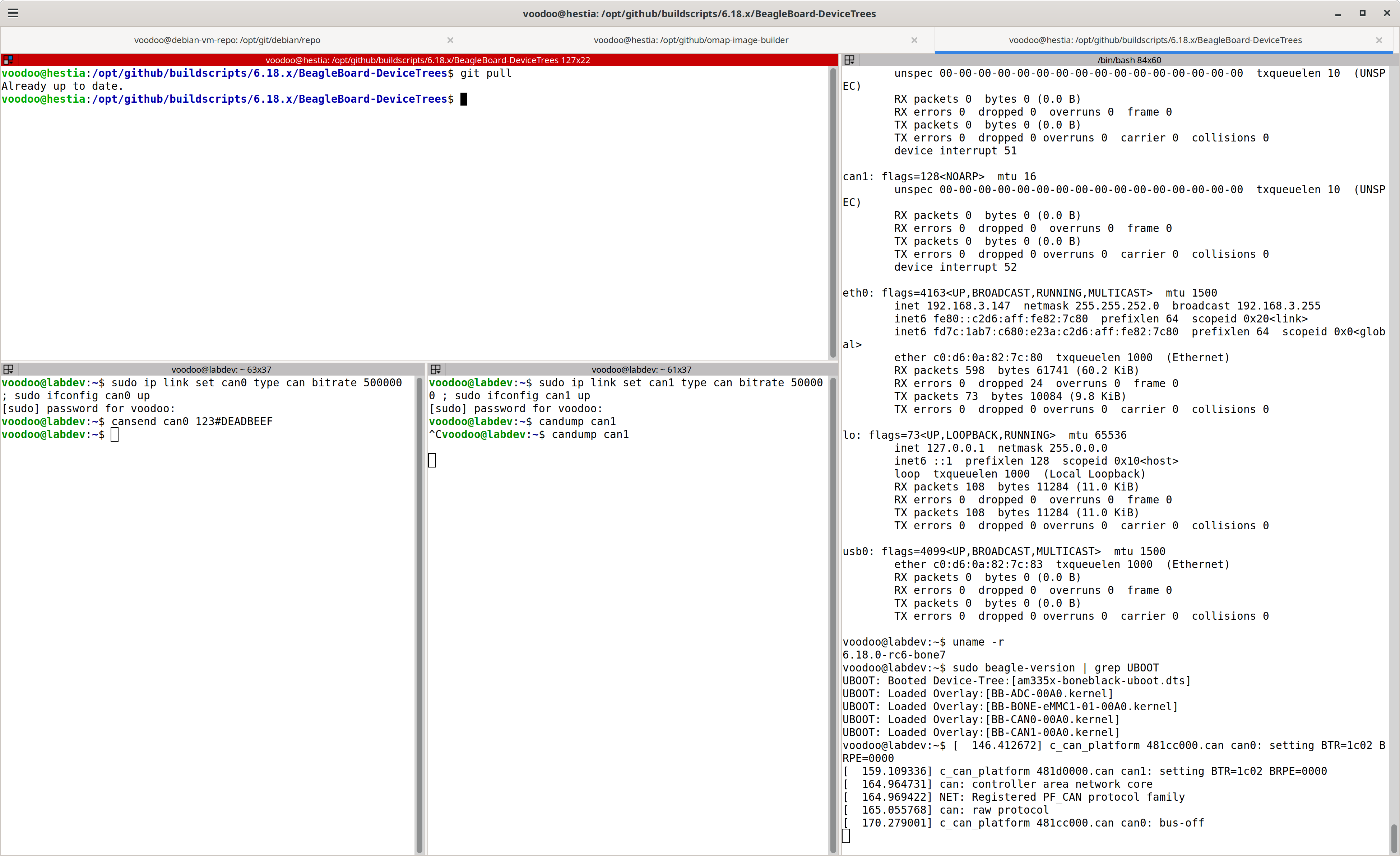
voodoo@labdev:~$ sudo ifconfig -a
[sudo] password for voodoo: 
can0: flags=128<NOARP>  mtu 16
        unspec 00-00-00-00-00-00-00-00-00-00-00-00-00-00-00-00  txqueuelen 10  (UNSPEC)
        RX packets 0  bytes 0 (0.0 B)
        RX errors 0  dropped 0  overruns 0  frame 0
        TX packets 0  bytes 0 (0.0 B)
        TX errors 0  dropped 0 overruns 0  carrier 0  collisions 0
        device interrupt 51  

can1: flags=128<NOARP>  mtu 16
        unspec 00-00-00-00-00-00-00-00-00-00-00-00-00-00-00-00  txqueuelen 10  (UNSPEC)
        RX packets 0  bytes 0 (0.0 B)
        RX errors 0  dropped 0  overruns 0  frame 0
        TX packets 0  bytes 0 (0.0 B)
        TX errors 0  dropped 0 overruns 0  carrier 0  collisions 0
        device interrupt 52  
voodoo@labdev:~$ dmesg | grep can
[   51.468764] c_can_platform 481cc000.can: c_can_platform device registered (regs=bd3b6e60, irq=51)
[   51.632093] c_can_platform 481d0000.can: c_can_platform device registered (regs=7ace0a0c, irq=52)
voodoo@labdev:~$ sudo beagle-version | grep UBOOT
UBOOT: Booted Device-Tree:[am335x-boneblack-uboot.dts]
UBOOT: Loaded Overlay:[BB-ADC-00A0.kernel]
UBOOT: Loaded Overlay:[BB-BONE-eMMC1-01-00A0.kernel]
UBOOT: Loaded Overlay:[BB-CAN0-00A0.kernel]
UBOOT: Loaded Overlay:[BB-CAN1-00A0.kernel]

Regards,

2 Likes

from: /opt/source/dtb-6.17.x

git pull

remote: Internal Server Error
fatal: unable to access ‘https://github.com/beagleboard/BeagleBoard-DeviceTrees.git/’: The requested URL returned error: 500

still having Cloudflair issues?

pretty sure github is on Microsoft’s Azure at this point…

Nope, corrected… it’s moving… but not yet.. Microsoft is moving GitHub over to Azure servers | The Verge

Adapter just arrived…

okay… something is weird…

Unscrews my 120 Ohm resistor…

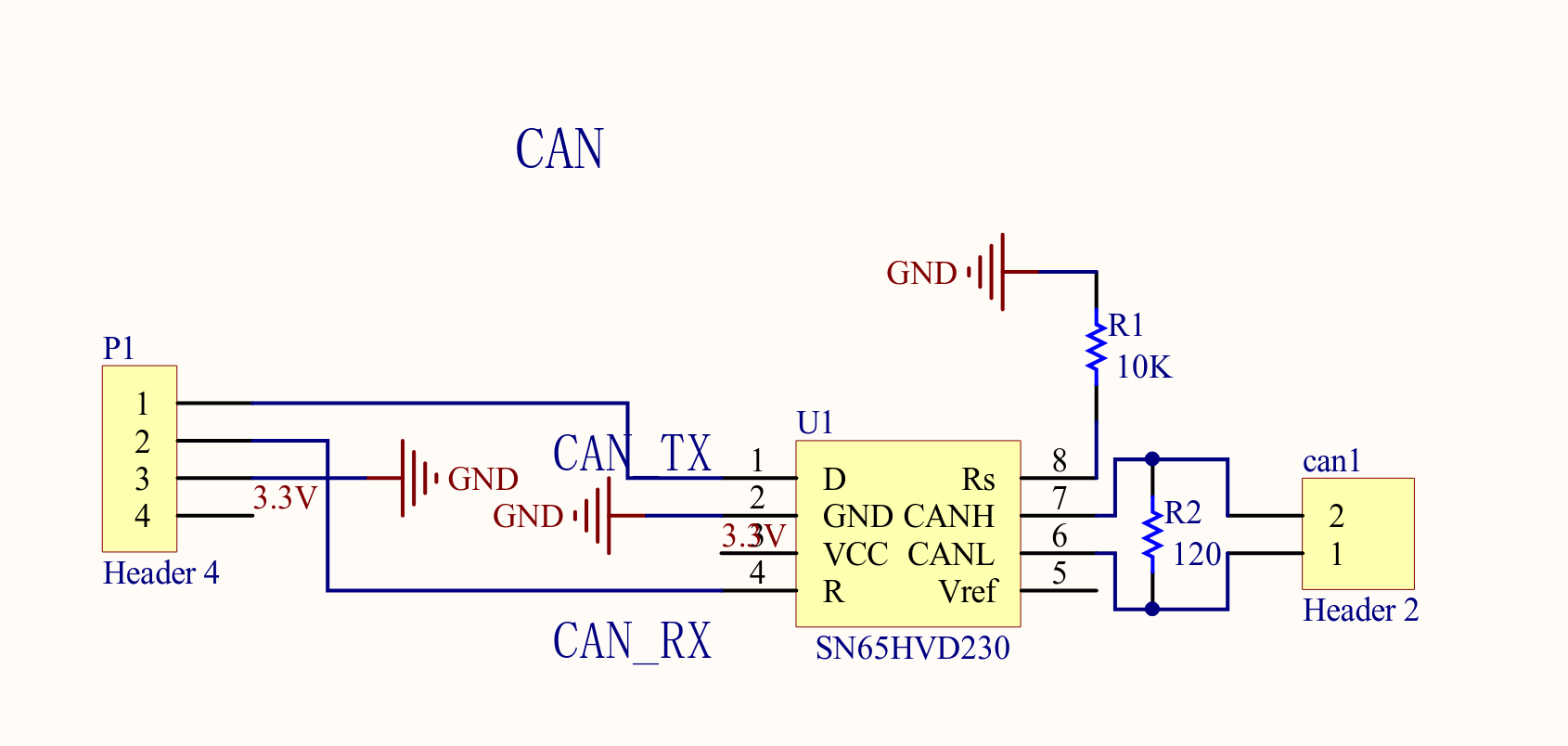
Nope it was all me… Can isn’t like uart tx/rx and you swap them… nope CAN_TX goes to CAN_TX, as CAN_RX goes to CAN_RX…

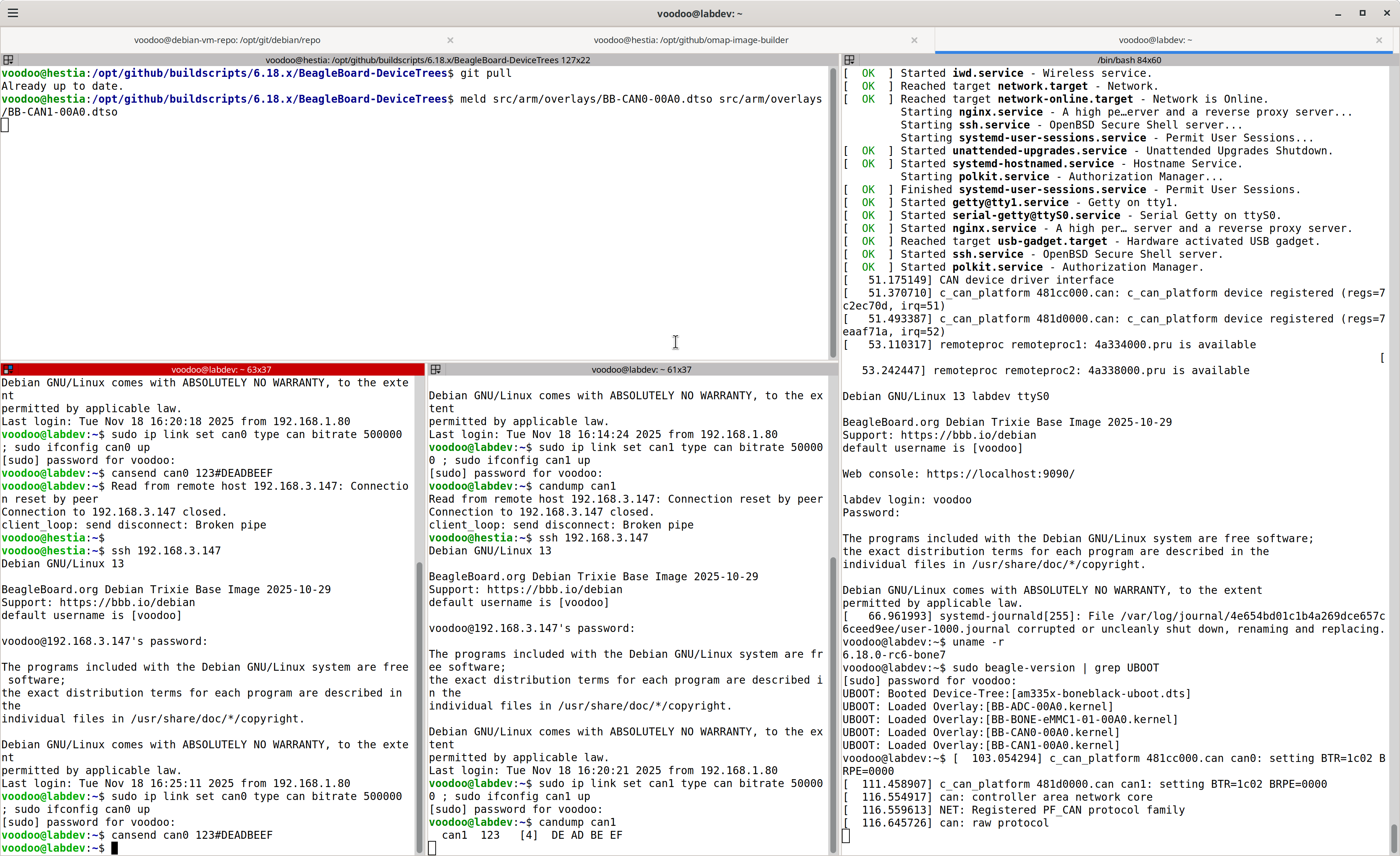
Success…

sudo ip link set can0 type can bitrate 500000 ; sudo ifconfig can0 up
sudo ip link set can1 type can bitrate 500000 ; sudo ifconfig can1 up
candump can1
cansend can0 123#DEADBEEF

Regards,

2 Likes