when I update using ‘apt-get update’, I got the following error,
W: GPG error: http://repos.rcn-ee.net trusty InRelease: The following signatures couldn’t be verified because the public key is not available: NO_PUBKEY D284E608A4C46402
I’ve tried following command given in some forum
apt-key adv --keyserver keyserver.ubuntu.com --recv-key D284E608A4C46402
the output is as follows
Executing: gpg --ignore-time-conflict --no-options --no-default-keyring --homedir /tmp/tmp.YlaPkjE1g4 --no-auto-check-trustdb --trust-model always --keyring /etc/apt/trusted.gpg --primary-keyring /etc/apt/trusted.gpg --keyserver keyserver.ubuntu.com --recv-key D284E608A4C46402
gpg: requesting key A4C46402 from hkp server keyserver.ubuntu.com
gpgkeys: key D284E608A4C46402 not found on keyserver
gpg: no valid OpenPGP data found.
gpg: Total number processed: 0
and I’ve tried
gpg --keyserver keyserver.ubuntu.com --recv-key D284E608A4C46402
the output is
gpg: requesting key A4C46402 from hkp server keyserver.ubuntu.com
gpgkeys: key D284E608A4C46402 not found on keyserver
gpg: no valid OpenPGP data found.
gpg: Total number processed: 0
and still I get the GPG error same as above, can anyone suggest me a solution?
sudo apt-get install rcn-ee-archive-keyring
Regards,
thanks Robert, that worked like charm.
I try to run “sudo apt-get install rcn-ee-archive-keyring” and I get a 404 not found error pointing at the following url:
http://repos.rcn-ee.net/ubuntu/pool/main/r/rcn-ee-archive-keyring/rcn-ee-archive-keyring_2015.01.28~20150213+1_all.deb
Run:
sudo apt-get update first...
I just updated the keyring for Debian Stretch & Ubuntu Wily this week..
Regards,
1 Like
I did a sudo apt-get update first and it told me it couldn’t get you your repos which is why I googled the error and found the “sudo apt-get install rcn-ee-archieve-keyring”.
It is a catch 22 for me =(
hah, sorry Robert if I wasnt entrenched in my own little world right now, I would have picked picked this up for you.
When it rains . . .
I hate to sound stupid, but I am pretty new to this this and I don’t know what to do with all of the files on the webpage let alone which one to choose.
Just can't wait for July when that old 1 year gpg key expires.. 
The final pieces for the merge over are in the repo. (i've been
shipping both keys since February in that package)
So we will see in the next month or two, how many people don't run
'apt-get update ; apt-get upgrade'...
The good news, the replacement key doesn't expire...
Regards,
debian@beaglebone:~$ wget http://rcn-ee.com/repos/debian/pool/main/r/rcn-ee-archive-keyring/rcn-ee-archive-keyring_2015.05.06~bpo70+20150506+1_all.deb
debian@beaglebone:~$ sudo dpkg -i rcn*.deb
debian@beaglebone:~$ sudo apt-get update && upgrade
Those 3 commands should fix you up.
Also, since you mentioned you’re new you should change your root and debian passwords. To do this . . .
debian@beaglebone:~$ sudo passwd
Enter new UNIX password:
Retype new UNIX password:
passwd: password updated successfully
debian@beaglebone:~$ sudo passwd debian
Enter new UNIX password:
Retype new UNIX password:
passwd: password updated successfully
First is for root, second is for the debian user.
Sorry this is slightly wrong:
debian@beaglebone:~$ sudo apt-get update && upgrade
should be . . .
debian@beaglebone:~$ sudo apt-get update && apt-get upgrade
Doing like 500 different things all at once here. . .
pffft . . . I normally do each command on a separate line . . .
debian@beaglebone:~$ sudo apt-get update
debian@beaglebone:~$ sudo apt-get upgrade
But can be done all on one line as such.
debian@beaglebone:~$ sudo apt-get update && sudo apt-get upgrade
Downloading the rcn-ee-archive-keyring package over http and blindly installing the key is a bad idea. Someone could include an extra key that he controls and then have the ability to mount a successful MiTM attack to any package installation.
I just uploaded the key to the ubuntu keyserver, and it will soon propagate to all the other major ones. http://keyserver.ubuntu.com/pks/lookup?op=vindex&search=0xD284E608A4C46402&fingerprint=on
The original command works fine now apt-key adv --keyserver [keyserver.ubuntu.com](http://keyserver.ubuntu.com/) --recv-key D284E608A4C46402
Τη Σάββατο, 9 Μαΐου 2015 - 12:49:15 π.μ. UTC+1, ο χρήστης William Hermans έγραψε:
1 Like
I hate to be a necromancer, but it’s 2025, literally 10 years later, and I am still seeing this problem despite following just about all the advice I can find from 10 years ago, including manually retrieving the bookworm key package from Robert’s site and installing it.
@RobertCNelson if you’re still maintaining this actively, can you assist?
Err:4 https://repos.rcn-ee.com/debian bookworm InRelease
  The following signatures couldn't be verified because the public key is not available: NO_PUBKEY D284E608A4C46402
@mshappe
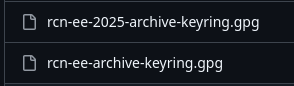
Debian 12 Bookworm, requires external repository’s to have the key stated in the signed-by section of sources. (Prior to Debian 12, we could get away with the file setup by apt-key, but that’s long gone now)… For our BeagleBoard images, the package bbb.io-keyring should be installed, which contains the public key and apt sources examples: repos-armhf/bbb.io-keyring/suite/bookworm/debian at master · beagleboard/repos-armhf · GitHub
example beagle.list: installed under: /etc/bbb.io/templates/apt/
sudo cp -v /etc/bbb.io/templates/apt/beagle.list /etc/apt/sources.list.d/
beagle.list: repos-armhf/bbb.io-keyring/suite/bookworm/debian/beagle.list at master · beagleboard/repos-armhf · GitHub
contents of beagle.list:
deb [arch=armhf signed-by=/usr/share/keyrings/rcn-ee-archive-keyring.gpg] http://repos.rcn-ee.com/debian/ bookworm main
#deb-src [arch=armhf signed-by=/usr/share/keyrings/rcn-ee-archive-keyring.gpg] http://repos.rcn-ee.com/debian/ bookworm main
Side note, we got 10+ years out of that key. Debian 13 (trixie) (apt 3.0.x) is expiring that key (algorthim), so any Debian 12 → Debian 13 upgrades will need a manual tweak.. (sudo cp…) and then things will be okay.
This new 2025 key is already generated and installed with bbb.io-keyring, but will only be used for Debian 13 (trixie) and newer, (until apt forces another algorithm)… My goal was to not ‘break’ old installs by updating the 10 year old key..
Regards,