Just pushed out & tested locally:
http://elinux.org/Beagleboard:BeagleBoneBlack_Debian#2014-03-27
Regards,
Just pushed out & tested locally:
http://elinux.org/Beagleboard:BeagleBoneBlack_Debian#2014-03-27
Regards,
It’s working. Thanks!
–Mark
I downloaded and tested the March 27th image today. Thanks for including xrdp-it made testing wifi go much faster. Here’s what I found.
I was able to connect to a WPA2 secured network at the school where I teach
I was unable to connect to my cell phone when unsecured (Android portable wifi hotspot)
I was able to connect to my cell phone if I secured the connection (WPA2 PSK)
I was unable to connect to a WPA2 secured network at home
One of my students was able to connect to the WPA2 secured school network, another was unable to connect
The students that was unable to connect to the school network was also unable to connect to my cell phone (secured as well-didn’t try unsecured)
I was able to create an ad-hoc network (at least I think it did because it showed up in Wicd)
We were all using the tiny Adafruit dongles and tethered to BeagleBones via USB. Whenever we were unable to connect, we could see the connection-it just timed out when trying to get an IP (unsecured networks) or authenticating (secured network). Any ideas?
I also tried setting up an ad-hoc network. It showed up within Wicd, but I wasn’t able to detect it with a computer, my Android cell phone, or an iPhone. Is ad-hoc working for anybody else?
Given the inconsistency, I’m guessing the problem is hardware (the dongle), so I ordered a few of the Netgear WNA1100 dongles. Should have them in a couple of weeks.
Also, looks like the eMMC version doesn’t have Wicd functioning out of the box.
Thanks for all the work you’re putting into this.
Robert,
Thanks for the flurry of updated Debian images for testing (3/4, 3/19, 3/27). I am happily trying the different images, but when I download the image and “start from scratch” it takes me several hours to get back to the point where I can use my system again. I use Open Lighting Architecture and it takes me about 4+hours to do everything necessary to compile it from source. Could I update to your newest distros somehow by running a script (Mar4 → Mar19 → Mar27)? … or is it necessary to wipe everything out and reflash the image from scratch? Some of my BBBs I flash the eMMC and some of them I boot directly from the uSD. Thx!! (and sorry if this has already been answered somewhere).
cd /opt/scripts/fixes
git pull
sudo ./debian-2014-03-04-to-2014-03-19.sh
sudo ./debian-2014-03-19-to-2014-03-27.sh
The only thing it doesn't do is update the bootloader from v2013.10 in
2014-03-04 to v2014.04-rc in 2014-03-19+
For that:
cd /opt/scripts/tools/
sudo ./update_bootloader.sh
Regards,
PS: you can see to review the change here:
https://github.com/RobertCNelson/boot-scripts/tree/master/fixes
Regards,
Another option is to put your lighting code on a network file share, or
you can rsync the build directory to a server somewhere. You'll
probably have to re-run some of the build steps (like the install part)
when switching to a clean OS, but it ought to take much less than 4
hours to setup from scratch, and you shouldn't have to actually
recompile anything (which is typically _slow_ on the BBB).
I worked this way when getting LinuxCNC running on the BBB. I mounted a
home directory via nfs from a remote server, and I was able to swap
between various boards and OS installs while keeping a consistent
development environment. This also let me use some tools running on
full-blown Linux and Windows systems that would have been a bit heavy
for the BBB (my regular text editor, some graphical git utilities, etc).
+1 for NFS mounted shares. I like to share out a rootfs for my BBB, and then run Samba from the server so I can map the drive on Windows to make things easier for me. Since I run many dev tools on Windows, including a cross compile setup.
My BeagleBone part of a primitive robot with a breadboard strapped to the top, and servo motors underneath. The wifi dongle was between both. For this reason, I dug out my unpowered USB hub and used it as an extender to get the wifi dong’e away from all the metal. I powered the beagle bone with an external power supply and remoted into it via usb. I was able to get the Adafruit dongle to connect to my secured home network 1 out of three times this time around as well as a secured hotspot hosted by my phone. This was better than the netgrear wna1100 which was only able to connect to the secured hotspot (not my regular home network). Neither was able to connect to an unsecured hotspot. Attempts to connect via wifi also seem to cause the BeagleBone to freeze up frequently. Any ideas?
Also, it would be really handy if the default user was root (like on Angstrom) so that I didn’t have to type sudo su before most terminal commands. This would also allow me to open files more easily. I’m guessing this would also allow the user to reboot and shutdown the beaglebone, options which are missing from LXDE at this point, and which cannot be execute from the command line using the debian user.
My BeagleBone part of a primitive robot with a breadboard strapped to the
top, and servo motors underneath. The wifi dongle was between both. For this
reason, I dug out my unpowered USB hub and used it as an extender to get the
wifi dong'e away from all the metal. I powered the beagle bone with an
external power supply and remoted into it via usb. I was able to get the
Adafruit dongle to connect to my secured home network 1 out of three times
this time around as well as a secured hotspot hosted by my phone. This was
better than the netgrear wna1100 which was only able to connect to the
secured hotspot (not my regular home network). Neither was able to connect
to an unsecured hotspot. Attempts to connect via wifi also seem to cause the
BeagleBone to freeze up frequently. Any ideas?
The is problem with the default 3.8 kernel, if your not using any
cape's switch to the 3.13.x based kernel
cd /opt/script/tools/
git pull
sudo ./update_kernel.sh --beta-kernel
Also, it would be really handy if the default user was root (like on
Angstrom) so that I didn't have to type sudo su before most terminal
commands. This would also allow me to open files more easily. I'm guessing
this would also allow the user to reboot and shutdown the beaglebone,
options which are missing from LXDE at this point, and which cannot be
execute from the command line using the debian user.
There is a default root user (no password like Angstrom) we just don't
log into that user via lxde.
Regards,
What is the problem with the default kernel? That wifi doesn’t work good in general, that it doesn’t connect to unsecured networks, that Wicd is buggy and will freeze up the BeagleBone? I went ahead and updated the kernel. I am now able to connect to secured and unsecured networks using the Adafruit dongle. I had limited success with the netgear wna1100 which definitely does NOW work better than the Adafruit dongle. The UWN200 also came in the mail today, but the BeagleBone was unable to detect it. Is it supposed to run out of the box on the newer images, or do I have to implement some sort of fix? The adafruit dongle shows up as wlan0, and the netgear shows up as wlan1. I read that the uwn200 is supposed to show up as ra0, but when I switch wicd accordingly, it still doesn’t detect the dongle, and there’s no wifi when I run ifconfig.
Also, is there any way to log into lxde using the root user? That would save me and my students some typing and other problems (such as opening certain files with leafpad, etc.).
Again, thanks for all the work you’re putting into this image. You’re ironing out a lot of the kinds that my students have been stumbling over.
I just thought others might want to know that switching to the 3.13.6-bone8 kernel also changes the resolution of the HDMI display output from 720p (i.e. 1280 x 720) to 1280 x 960, a 33% increase in display real estate. I suspect there is no audio at this resolution, but I have a monitor connected and not a TV, so I can’t tell.
HTH
Dennis Cote
Correct, hdmi audio is currently disabled with the v3.13.x patchset,
so you'll get non-audio resolution options. I was seeing headache
inducing screen shakes on my work monitor, will try again with v3.14.x
(the patchset hasn't hit mainline yet).
Regards,
Question: For the fun of it, I updated my system to the latest build (3/31) Also updated the kernel using the script you mentioned.
Then thought I would test out building and running my Hexapod code. As part of my code base I have some Sound output including Tones (beeps) using Alsa as well as Espeak…
I git cloned the stuff down from my github project: https://github.com/KurtE/Raspberry_Pi (Sorry about the project name) and did the stuff in my Readme file that included sudo apt-get of the stuff for ALSA and Espeak and got everything to build. I use an external USB sound adapter. With previous builds I was able to get the sound to work by creating a sound configuration file: /etc/asound.conf pcm. with the content of:
!default sysdefault:Device
So far when I try it with this build I am not having much luck:
Still investigating. Suggestions?
Seeing messages like:
kurt@beaglebone:~$ cat /etc/asound.conf
!default sysdefault:Device
kurt@beaglebone:~$ espeak “Hi There”
ALSA lib confmisc.c:768:(parse_card) cannot find card ‘0’
ALSA lib conf.c:4241:(_snd_config_evaluate) function snd_func_card_driver returned error: No such file or directory
ALSA lib confmisc.c:392:(snd_func_concat) error evaluating strings
ALSA lib conf.c:4241:(_snd_config_evaluate) function snd_func_concat returned error: No such file or directory
ALSA lib confmisc.c:1251:(snd_func_refer) error evaluating name
ALSA lib conf.c:4241:(_snd_config_evaluate) function snd_func_refer returned error: No such file or directory
ALSA lib conf.c:4720:(snd_config_expand) Evaluate error: No such file or directory
ALSA lib pcm.c:2217:(snd_pcm_open_noupdate) Unknown PCM sysdefault
ALSA lib confmisc.c:768:(parse_card) cannot find card ‘0’
ALSA lib conf.c:4241:(_snd_config_evaluate) function snd_func_card_driver returned error: No such file or directory
ALSA lib confmisc.c:392:(snd_func_concat) error evaluating strings
ALSA lib conf.c:4241:(_snd_config_evaluate) function snd_func_concat returned error: No such file or directory
ALSA lib confmisc.c:1251:(snd_func_refer) error evaluating name
ALSA lib conf.c:4241:(_snd_config_evaluate) function snd_func_refer returned error: No such file or directory
ALSA lib conf.c:4720:(snd_config_expand) Evaluate error: No such file or directory
ALSA lib pcm.c:2217:(snd_pcm_open_noupdate) Unknown PCM sysdefault
ALSA lib confmisc.c:768:(parse_card) cannot find card ‘0’
ALSA lib conf.c:4241:(_snd_config_evaluate) function snd_func_card_driver returned error: No such file or directory
ALSA lib confmisc.c:392:(snd_func_concat) error evaluating strings
ALSA lib conf.c:4241:(_snd_config_evaluate) function snd_func_concat returned error: No such file or directory
ALSA lib confmisc.c:1251:(snd_func_refer) error evaluating name
ALSA lib conf.c:4241:(_snd_config_evaluate) function snd_func_refer returned error: No such file or directory
ALSA lib conf.c:4720:(snd_config_expand) Evaluate error: No such file or directory
ALSA lib pcm.c:2217:(snd_pcm_open_noupdate) Unknown PCM front
ALSA lib pcm.c:2217:(snd_pcm_open_noupdate) Unknown PCM cards.pcm.rear
ALSA lib pcm.c:2217:(snd_pcm_open_noupdate) Unknown PCM cards.pcm.center_lfe
ALSA lib pcm.c:2217:(snd_pcm_open_noupdate) Unknown PCM cards.pcm.side
ALSA lib confmisc.c:768:(parse_card) cannot find card ‘0’
ALSA lib conf.c:4241:(_snd_config_evaluate) function snd_func_card_driver returned error: No such file or directory
ALSA lib confmisc.c:392:(snd_func_concat) error evaluating strings
ALSA lib conf.c:4241:(_snd_config_evaluate) function snd_func_concat returned error: No such file or directory
ALSA lib confmisc.c:1251:(snd_func_refer) error evaluating name
ALSA lib conf.c:4241:(_snd_config_evaluate) function snd_func_refer returned error: No such file or directory
ALSA lib conf.c:4720:(snd_config_expand) Evaluate error: No such file or directory
ALSA lib pcm.c:2217:(snd_pcm_open_noupdate) Unknown PCM surround40
ALSA lib confmisc.c:768:(parse_card) cannot find card ‘0’
ALSA lib conf.c:4241:(_snd_config_evaluate) function snd_func_card_driver returned error: No such file or directory
ALSA lib confmisc.c:392:(snd_func_concat) error evaluating strings
ALSA lib conf.c:4241:(_snd_config_evaluate) function snd_func_concat returned error: No such file or directory
ALSA lib confmisc.c:1251:(snd_func_refer) error evaluating name
ALSA lib conf.c:4241:(_snd_config_evaluate) function snd_func_refer returned error: No such file or directory
ALSA lib conf.c:4720:(snd_config_expand) Evaluate error: No such file or directory
ALSA lib pcm.c:2217:(snd_pcm_open_noupdate) Unknown PCM surround41
ALSA lib confmisc.c:768:(parse_card) cannot find card ‘0’
ALSA lib conf.c:4241:(_snd_config_evaluate) function snd_func_card_driver returned error: No such file or directory
ALSA lib confmisc.c:392:(snd_func_concat) error evaluating strings
ALSA lib conf.c:4241:(_snd_config_evaluate) function snd_func_concat returned error: No such file or directory
ALSA lib confmisc.c:1251:(snd_func_refer) error evaluating name
ALSA lib conf.c:4241:(_snd_config_evaluate) function snd_func_refer returned error: No such file or directory
ALSA lib conf.c:4720:(snd_config_expand) Evaluate error: No such file or directory
ALSA lib pcm.c:2217:(snd_pcm_open_noupdate) Unknown PCM surround50
ALSA lib confmisc.c:768:(parse_card) cannot find card ‘0’
ALSA lib conf.c:4241:(_snd_config_evaluate) function snd_func_card_driver returned error: No such file or directory
ALSA lib confmisc.c:392:(snd_func_concat) error evaluating strings
ALSA lib conf.c:4241:(_snd_config_evaluate) function snd_func_concat returned error: No such file or directory
ALSA lib confmisc.c:1251:(snd_func_refer) error evaluating name
ALSA lib conf.c:4241:(_snd_config_evaluate) function snd_func_refer returned error: No such file or directory
ALSA lib conf.c:4720:(snd_config_expand) Evaluate error: No such file or directory
ALSA lib pcm.c:2217:(snd_pcm_open_noupdate) Unknown PCM surround51
ALSA lib confmisc.c:768:(parse_card) cannot find card ‘0’
ALSA lib conf.c:4241:(_snd_config_evaluate) function snd_func_card_driver returned error: No such file or directory
ALSA lib confmisc.c:392:(snd_func_concat) error evaluating strings
ALSA lib conf.c:4241:(_snd_config_evaluate) function snd_func_concat returned error: No such file or directory
ALSA lib confmisc.c:1251:(snd_func_refer) error evaluating name
ALSA lib conf.c:4241:(_snd_config_evaluate) function snd_func_refer returned error: No such file or directory
ALSA lib conf.c:4720:(snd_config_expand) Evaluate error: No such file or directory
ALSA lib pcm.c:2217:(snd_pcm_open_noupdate) Unknown PCM surround71
ALSA lib confmisc.c:768:(parse_card) cannot find card ‘0’
ALSA lib conf.c:4241:(_snd_config_evaluate) function snd_func_card_driver returned error: No such file or directory
ALSA lib confmisc.c:392:(snd_func_concat) error evaluating strings
ALSA lib conf.c:4241:(_snd_config_evaluate) function snd_func_concat returned error: No such file or directory
ALSA lib confmisc.c:1251:(snd_func_refer) error evaluating name
ALSA lib conf.c:4241:(_snd_config_evaluate) function snd_func_refer returned error: No such file or directory
ALSA lib conf.c:4720:(snd_config_expand) Evaluate error: No such file or directory
ALSA lib pcm.c:2217:(snd_pcm_open_noupdate) Unknown PCM iec958
ALSA lib confmisc.c:768:(parse_card) cannot find card ‘0’
ALSA lib conf.c:4241:(_snd_config_evaluate) function snd_func_card_driver returned error: No such file or directory
ALSA lib confmisc.c:392:(snd_func_concat) error evaluating strings
ALSA lib conf.c:4241:(_snd_config_evaluate) function snd_func_concat returned error: No such file or directory
ALSA lib confmisc.c:1251:(snd_func_refer) error evaluating name
ALSA lib conf.c:4241:(_snd_config_evaluate) function snd_func_refer returned error: No such file or directory
ALSA lib conf.c:4720:(snd_config_expand) Evaluate error: No such file or directory
ALSA lib pcm.c:2217:(snd_pcm_open_noupdate) Unknown PCM spdif
ALSA lib confmisc.c:768:(parse_card) cannot find card ‘0’
ALSA lib conf.c:4241:(_snd_config_evaluate) function snd_func_card_driver returned error: No such file or directory
ALSA lib confmisc.c:392:(snd_func_concat) error evaluating strings
ALSA lib conf.c:4241:(_snd_config_evaluate) function snd_func_concat returned error: No such file or directory
ALSA lib confmisc.c:1251:(snd_func_refer) error evaluating name
ALSA lib conf.c:4241:(_snd_config_evaluate) function snd_func_refer returned error: No such file or directory
ALSA lib conf.c:4720:(snd_config_expand) Evaluate error: No such file or directory
ALSA lib pcm.c:2217:(snd_pcm_open_noupdate) Unknown PCM spdif
ALSA lib pcm.c:2217:(snd_pcm_open_noupdate) Unknown PCM cards.pcm.hdmi
ALSA lib pcm.c:2217:(snd_pcm_open_noupdate) Unknown PCM cards.pcm.hdmi
ALSA lib pcm.c:2217:(snd_pcm_open_noupdate) Unknown PCM cards.pcm.modem
ALSA lib pcm.c:2217:(snd_pcm_open_noupdate) Unknown PCM cards.pcm.modem
ALSA lib pcm.c:2217:(snd_pcm_open_noupdate) Unknown PCM cards.pcm.phoneline
ALSA lib pcm.c:2217:(snd_pcm_open_noupdate) Unknown PCM cards.pcm.phoneline
ALSA lib confmisc.c:768:(parse_card) cannot find card ‘0’
ALSA lib conf.c:4241:(_snd_config_evaluate) function snd_func_card_driver returned error: No such file or directory
ALSA lib confmisc.c:392:(snd_func_concat) error evaluating strings
ALSA lib conf.c:4241:(_snd_config_evaluate) function snd_func_concat returned error: No such file or directory
ALSA lib confmisc.c:1251:(snd_func_refer) error evaluating name
ALSA lib conf.c:4241:(_snd_config_evaluate) function snd_func_refer returned error: No such file or directory
ALSA lib conf.c:4720:(snd_config_expand) Evaluate error: No such file or directory
ALSA lib pcm.c:2217:(snd_pcm_open_noupdate) Unknown PCM default
ALSA lib confmisc.c:768:(parse_card) cannot find card ‘0’
ALSA lib conf.c:4241:(_snd_config_evaluate) function snd_func_card_driver returned error: No such file or directory
ALSA lib confmisc.c:392:(snd_func_concat) error evaluating strings
ALSA lib conf.c:4241:(_snd_config_evaluate) function snd_func_concat returned error: No such file or directory
ALSA lib confmisc.c:1251:(snd_func_refer) error evaluating name
ALSA lib conf.c:4241:(_snd_config_evaluate) function snd_func_refer returned error: No such file or directory
ALSA lib conf.c:4720:(snd_config_expand) Evaluate error: No such file or directory
ALSA lib pcm.c:2217:(snd_pcm_open_noupdate) Unknown PCM default
ALSA lib confmisc.c:768:(parse_card) cannot find card ‘0’
ALSA lib conf.c:4241:(_snd_config_evaluate) function snd_func_card_driver returned error: No such file or directory
ALSA lib confmisc.c:392:(snd_func_concat) error evaluating strings
ALSA lib conf.c:4241:(_snd_config_evaluate) function snd_func_concat returned error: No such file or directory
ALSA lib confmisc.c:1251:(snd_func_refer) error evaluating name
ALSA lib conf.c:4241:(_snd_config_evaluate) function snd_func_refer returned error: No such file or directory
ALSA lib conf.c:4720:(snd_config_expand) Evaluate error: No such file or directory
ALSA lib pcm.c:2217:(snd_pcm_open_noupdate) Unknown PCM dmix
ALSA lib confmisc.c:768:(parse_card) cannot find card ‘0’
ALSA lib conf.c:4241:(_snd_config_evaluate) function snd_func_card_driver returned error: No such file or directory
ALSA lib confmisc.c:392:(snd_func_concat) error evaluating strings
ALSA lib conf.c:4241:(_snd_config_evaluate) function snd_func_concat returned error: No such file or directory
ALSA lib confmisc.c:1251:(snd_func_refer) error evaluating name
ALSA lib conf.c:4241:(_snd_config_evaluate) function snd_func_refer returned error: No such file or directory
ALSA lib conf.c:4720:(snd_config_expand) Evaluate error: No such file or directory
ALSA lib pcm.c:2217:(snd_pcm_open_noupdate) Unknown PCM dmix
FATAL: cannot locate cpu MHz in /proc/cpuinfo
I have the same problem…
You could solve it?
El dimecres 2 d’abril de 2014 8:09:52 UTC+2, mbba...@gmail.com va escriure:
Yes and no. The solution was worse than the problem. Updating to the development kernel as mentioned above resulted in better support for Wifi but an unstable LXDE environment. At this point I just don’t rely on Wifi.
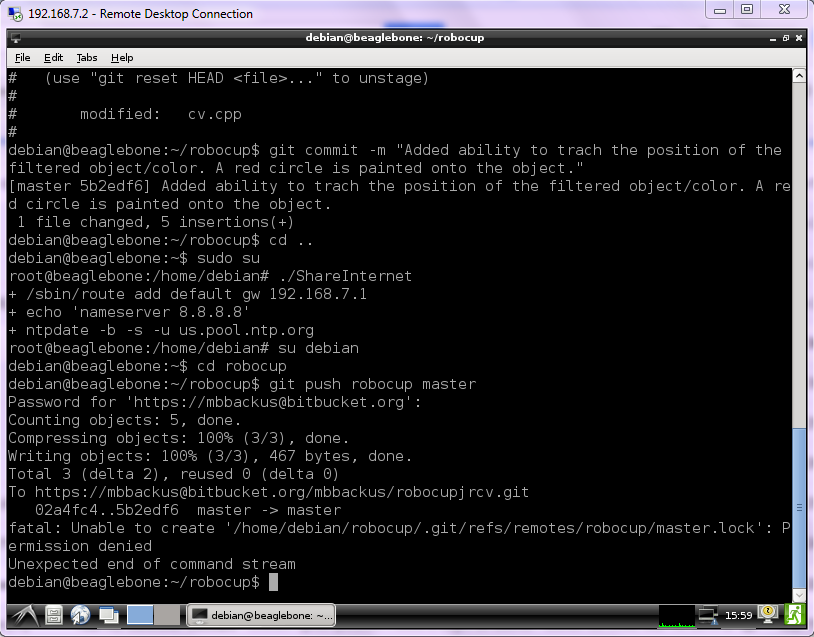
I’m still running into some annoying root/debian user permissions problems. First, I have to switch to the root user in order to run a script I wrote to share the host computer’s Internet connection. Second, when I push to git I get an error message about permission denied. The push goes through okay, but I don’t know how to go about fixing whatever is causing the error.
Below is a screen shot of my terminal that shows exactly what I’m doing.
Has this image OpenGL/SGX support? I would need it to get QtQuick running on it. Last year I was not able to get the driver compiled but as far as I remember TI has published some kernel patches back then.
Hi Robert,
I hope this isn’t a repeat. I thought I posted a similar message earlier today, but it has not showed up in the group (at least for me), so I am retrying.
Today I downloaded and installed a fresh copy of the latest, 2014-04-14, Debian image. Previously I had been using your update scripts to update my installation to the latest version, but I noticed there wasn’t an update script for this version when I did a git pull in the /opt/scripts directory.
While using the new version I noticed that I had the same problems with my mouse pointer becoming invisible whenever I log out of LXDE, and the DPMS screen blanking being disabled, that I had reported earlier.
To correct this I removed the ~/.xsessionrc file to get the default, On, state for the dpms screen blanking. I also had to add the following line to the end of the Device section of the /etc/X11/xorg.conf file. Without this line I had no mouse pointer at all.
Option “SWCursor” “true”
I now have a mouse pointer that remains visible across LXDE logout/login cycles, and my screen now turns off after 10 minutes of inactivity.
I really think this a better default setup since the BBB behave like a standard desktop PC (I have a USB keyboard and mouse, and an HDMI monitor). New users will get correct and standard operation. More experienced users can change these behaviors if they need to (to disable screen blanking on a kiosk for example), especially if there are clear instructions on how to do so.
While testing the changes to the ~/.xsessionrc file I notice that I am getting a ~/.xsession-errors file created on each reboot. This file contains the following message:
Openbox-Message: Unable to find a valid menu file “/usr/share/lxde/openbox/menu.xml”
Dennis Cote
Hello Everyone,
I’m having problems with the latest debian build (2014-04-23) and the WIFI dongle Edimax EW-7811Un.
I follow this link (https://groups.google.com/forum/#!topic/beaglebone/Q92uD9F1us8) to set up the dongle, can connect to wifi, but the connection is faulty, works for couple of minutes and than just stops.
Raspiberry Pi works great with the same adapter, where can i find a better drive for this dongle? what is the best dongle to use with this Debian images?
Thank you,
Vitor Henrique