mcan1 overlay does not create network

Hi there,
i’m trying to enable mcan1 on the BeagleY-AI, but the interface doesn’t get created.

The documentation shows two CAN Interfaces MCAN0 and MCAN1 are multiplexed to CSI1 and CSI2. ( Fig 3.61 and Fig 3.62 in the BeagleY-AI Schematic in https://docs.beagleboard.org/beagley-ai.pdf)
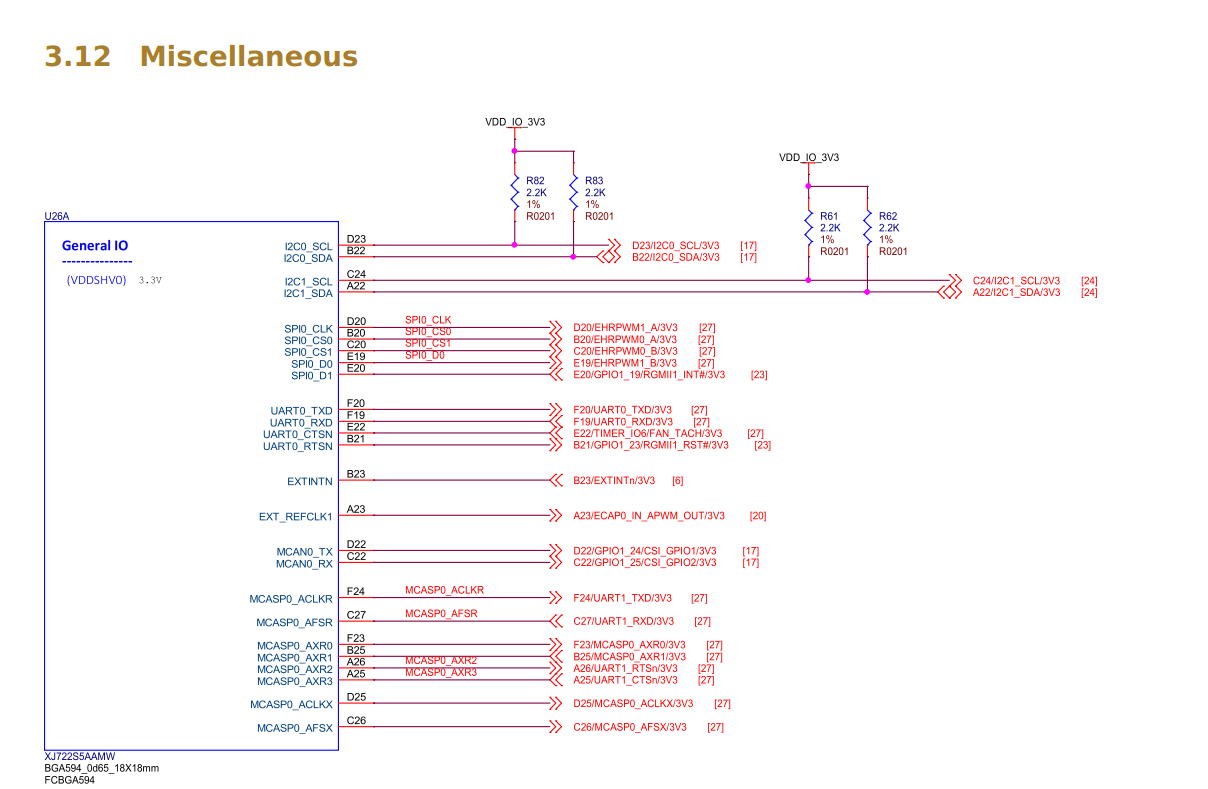
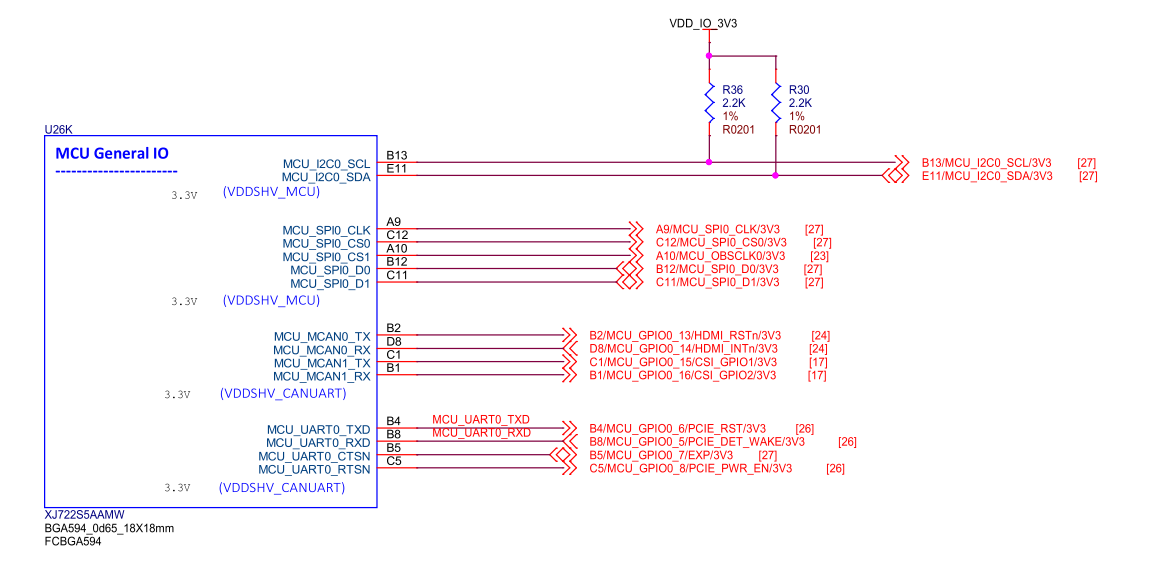
I’ve added two device-tree overlays to to enable mcan0 and mcan1, however only can0 gets created.
As Pin 14 is already used by i2c-4 ,so can0 won’t be functional anyway.

Therefore i’ve decided to use can1 as there are no devicetree-conflicts between mcan1 and any other hardware ( often i2c or hdmi) .

Somehow can1 doesn’t get created, but beagle-version shows, that the overlay has been loaded by U-Boot:

sudo beagle-version

eeprom:[BYAI202406000142]
model:[BeagleBoard.org_BeagleY-AI]
dogtag:[BeagleBoard.org Debian Trixie Base Image 2025-08-29]
bootloader:[/dev/mmcblk1]:[/boot/firmware/tiboot3.bin]:[U-Boot SPL 2025.07-g919ec3cd84f3 (Aug 07 2025 - 19:05:16 +0000)]
bootloader:[/dev/mmcblk1]:[/boot/firmware/tispl.bin]:[U-Boot SPL 2025.07-g919ec3cd84f3 (Aug 07 2025 - 19:05:16 +0000)]
bootloader:[/dev/mmcblk1]:[/boot/firmware/u-boot.img]:[U-Boot 2025.07-g919ec3cd84f3 (Aug 07 2025 - 19:05:16 +0000)]
UBOOT: Booted Device-Tree:[k3-am67a-beagley-ai.dts]
UBOOT: Loaded Overlay:[k3-am625-beaglemod-can0.kernel]
UBOOT: Loaded Overlay:[k3-am625-beaglemod-can1.kernel]
kernel:[6.1.83-ti-arm64-r72]

...
[ 10.701964] pinctrl-single 4084000.pinctrl: pin PIN14 already requested by 4-004c; cannot claim for 4e08000.can

[ 10.712205] pinctrl-single 4084000.pinctrl: pin-14 (4e08000.can) status -22

[ 10.719284] pinctrl-single 4084000.pinctrl: could not request pin 14 (PIN14) from group mcu-mcan0-pins-default on device pinctrl-single

Obviously i have to missed something, as ip link only show can0:

ip link
1: lo: <LOOPBACK,UP,LOWER_UP> mtu 65536 qdisc noqueue state UNKNOWN mode DEFAULT group default qlen 1000
    link/loopback 00:00:00:00:00:00 brd 00:00:00:00:00:00
2: dummy0: <BROADCAST,NOARP> mtu 1500 qdisc noop state DOWN mode DEFAULT group default qlen 1000
    link/ether ce:87:63:45:e2:21 brd ff:ff:ff:ff:ff:ff
3: eth0: <BROADCAST,MULTICAST,UP,LOWER_UP> mtu 1500 qdisc mq state UP mode DEFAULT group default qlen 1000
    link/ether c0:d6:0a:f9:76:85 brd ff:ff:ff:ff:ff:ff
    altname enxc0d60af97685
4: can0: <NOARP,ECHO> mtu 16 qdisc noop state DOWN mode DEFAULT group default qlen 10
    link/can 
5: wlan0: <NO-CARRIER,BROADCAST,MULTICAST,UP> mtu 1500 qdisc mq state DOWN mode DORMANT group default qlen 1000
    link/ether 10:ca:bf:d6:2c:30 brd ff:ff:ff:ff:ff:ff
6: SoftAp0: <NO-CARRIER,BROADCAST,MULTICAST,UP> mtu 1500 qdisc mq state DOWN mode DEFAULT group default qlen 1000
    link/ether 12:ca:bf:d6:2c:31 brd ff:ff:ff:ff:ff:ff
7: usb0: <NO-CARRIER,BROADCAST,MULTICAST,UP> mtu 1500 qdisc fq_codel state DOWN mode DEFAULT group default qlen 1000
    link/ether 1c:ba:8c:a2:ed:6b brd ff:ff:ff:ff:ff:ff

What have I to do to get can1 fully working ( pinmux and devicetree-overlay)?

Thanks for helping me out,
Kai
As I don’t have an Y-AI to test on, I can’t say for sure,
but one thing to look at is what happens as the kernel boots.

If any of the two overlays fail to probe, ip link is going to show
exactly one can if, namely can0.
Only by examining the kernel dmesg can you determine
if the address of the device is “the right one”.

Alternately, you could opt to just use one of the overlays at any given time.
That should yield can0 if the probe succeeds.

If you absolutely positively need to have a can1 if,
you’ll need to look at aliases in the base .dts file.

I’ve taken a look into the device tree and also grep’ed dmesg for further information.
For now, i will focus on can0, as can1 doesn’t get probed correctly.

kai@beaglebone:/proc$ ls /proc/device-tree/chosen/overlays/
k3-am625-beaglemod-can0.kernel  k3-am625-beaglemod-can1.kernel  name
kai@beaglebone:/proc$ dmesg | grep can1
kai@beaglebone:/proc$ dmesg | grep can0
[    9.000025] pinctrl-single 4084000.pinctrl: could not request pin 14 (PIN14) from group mcu-mcan0-pins-default  on device pinctrl-single
kai@beaglebone:/proc$ dmesg | grep m_can
[    9.000032] m_can_platform 4e08000.can: Error applying setting, reverse things back
[    9.062009] m_can_platform 20701000.can: m_can device registered (irq=592, version=32)
[   13.169437] Modules linked in: cc33xx rpmsg_ctrl rpmsg_char mac80211 libarc4 algif_aead cc33xx_sdio snd_soc_simple_card snd_soc_simple_card_utils pci_endpoint_test crct10dif_ce e5010_jpeg_enc pwm_fan cpufreq_dt at24 pvrsrvkm(O) phy_can_transceiver cfg80211 rti_wdt ti_k3_r5_remoteproc snd_soc_hdmi_codec wave5 btti_uart videobuf2_dma_contig bluetooth v4l2_mem2mem snd_soc_davinci_mcasp snd_soc_ti_udma snd_soc_ti_edma snd_soc_ti_sdma snd_soc_core videobuf2_memops videobuf2_v4l2 snd_pcm_dmaengine videobuf2_common snd_pcm videodev ti_k3_dsp_remoteproc ti_k3_common snd_timer mc snd omap_mailbox m_can_platform m_can can_dev optee_rng efi_pstore nfnetlink
[   13.173105] Modules linked in: cc33xx rpmsg_ctrl rpmsg_char mac80211 libarc4 algif_aead cc33xx_sdio snd_soc_simple_card snd_soc_simple_card_utils pci_endpoint_test crct10dif_ce e5010_jpeg_enc pwm_fan cpufreq_dt at24 pvrsrvkm(O) phy_can_transceiver cfg80211 rti_wdt ti_k3_r5_remoteproc snd_soc_hdmi_codec wave5 btti_uart videobuf2_dma_contig bluetooth v4l2_mem2mem snd_soc_davinci_mcasp snd_soc_ti_udma snd_soc_ti_edma snd_soc_ti_sdma snd_soc_core videobuf2_memops videobuf2_v4l2 snd_pcm_dmaengine videobuf2_common snd_pcm videodev ti_k3_dsp_remoteproc ti_k3_common snd_timer mc snd omap_mailbox m_can_platform m_can can_dev optee_rng efi_pstore nfnetlink

dmesg.txt (52,1 KB)

Somehow i need to disable hdmi to use can0. I didn’t had much time for further research today, but I’m pretty shure that i have to recompile the device-tree to disable hdmi.
( I couldn’t find any overlay to disable hdmi in the current trixie minimal image.)

Are there any options apart from patching the device-tree directly?

I’m doing more research tomorrow.
Thanks for taking your precious time,
Kai

Well, I believe you’ll be able to locate the can device living at 0x20701000 in the TRM,
as that is the one who makes it through probe.

From there you should be able to ascertain the right pin numbers.

Alright, i was able to create and load an additional device-tree overlay to the it66122 on the beagley-ai:

/dts-v1/;
/plugin/;

/ {
    fragment@0 {
        target = <&it66122>;
        __overlay__ {
            status = "disabled";
        };
    };
};

Finally the kernel warning about Pin 14 beeing already requested is gone.
I’m pretty shure m_can0 will be fully functional, as it is now probed up.
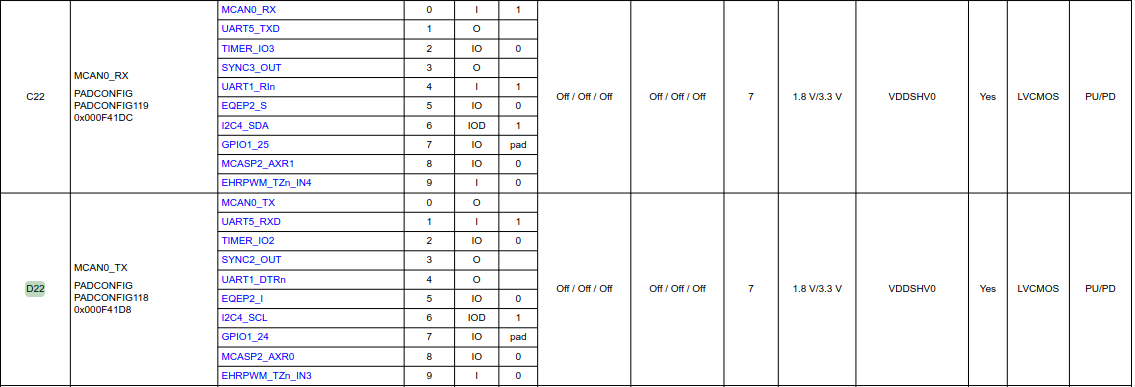
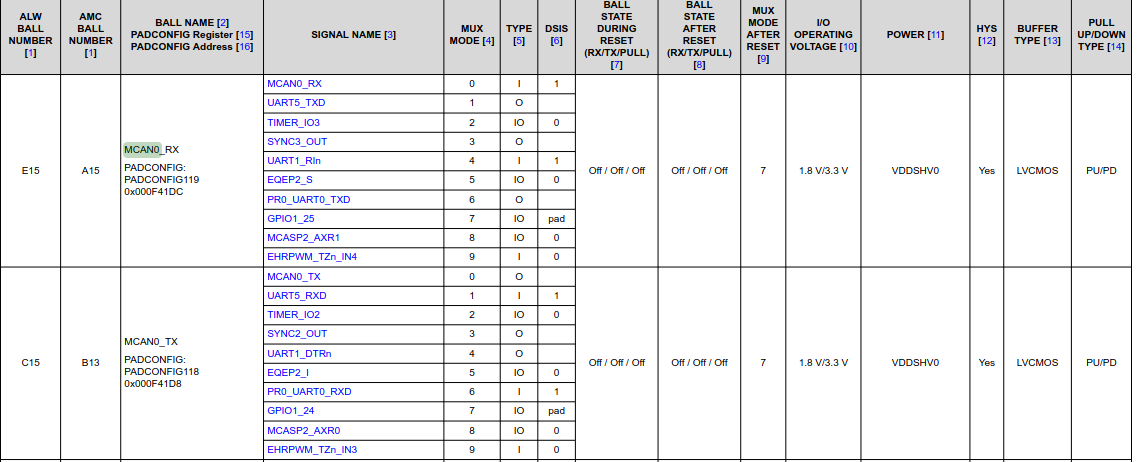
Also the datasheet shows the same offsets and mux modes as found in the existing overlay:

k3-am625-beaglemod-can0.dts`// SPDX-License-Identifier: GPL-2.0
/*
 * Copyright (C) 2022 Texas Instruments Incorporated - https://www.ti.com/
 */

/dts-v1/;
/plugin/;

#include "ti/k3-pinctrl.h"

/*
 * Helper to show loaded overlays under: /proc/device-tree/chosen/overlays/
 */
&{/chosen} {
	overlays {
		k3-am625-beaglemod-can0.kernel = __TIMESTAMP__;
	};
};

&{/} {
	transceiver1: can-phy1 {
		compatible = "ti,tcan1042";
		#phy-cells = <0>;
		max-bitrate = <5000000>;
	};
};

&main_pmx0 {
	main_mcan0_pins_default: main-mcan0-pins-default {
		pinctrl-single,pins = <
			AM62X_IOPAD(0x01dc, PIN_INPUT, 0) /* (E15) MCAN0_RX */
			AM62X_IOPAD(0x01d8, PIN_OUTPUT, 0) /* (C15) MCAN0_TX */
		>;
	};
};

&main_mcan0 {
	pinctrl-names = "default";
	pinctrl-0 = <&main_mcan0_pins_default>;
	phys = <&transceiver1>;
	status = "okay";
};

AM62x datasheet (page 28):

AM67x datasheet (page 24):

My CAN transceivers are arriving next week and I’m looking forward to run some CAN tests.
I wil report back with some block diagrams and wiring schematics once i’ve tested my setup.

I deeply appreciate your help.
Best regards
Kai