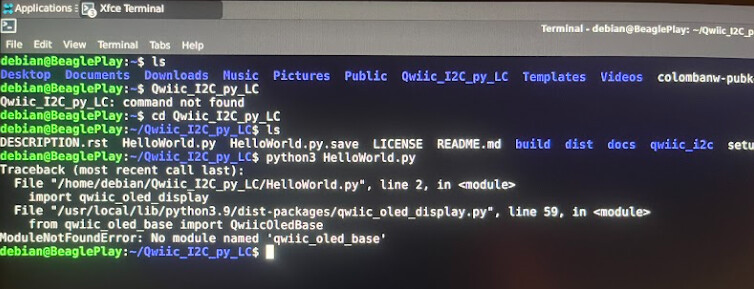
I am trying to write some code for controlling a PCF8575 I2C GPIO expander on the BeaglePlay using python. I am attempting to use the official Adafruit CircuitPython PCF8575 library. To install the library I used this command:
pip3 install adafruit-circuitpython-pcf8575
This code has fails to allow me to install this python library. After dealing with this and not finding a solution, I decided to see if I can download a different python library and follow the tutorial shown on the website shown from this website:
I went through the process of downloading the libraries in the terminal and when I run the code it gives me “No module named ‘qwiic_oled_base’.” I have also tried running some code with some other libraries and it seem to give me the same issues. I’m pretty new with this board so there is probably a lot I can learn. Do you have advice on how to download libraries correctly and any specific common issues that people run into during this process? Here is a photo of the error message.
1 Like
You should paste the output from your console here such that specific feedback can be provided, rather than screenshots.
Please provide as much of your log as you feel comfortable. More information is better.
Your issue looks like a Python one, not specific to BeaglePlay.
It seems you used pip to install a module. I don’t see that specific log. Often, when using pip, it is wise to use venv as well to give the modules a specific place to go as it otherwise is in conflict with the Linux distribution’s Python packaging.
NOTE: I have a personal beef with the code quality on pypi.org, but I’ll table that for now.
You’ll want do something like:
# Create .venv to store your `pip` installed modules
python -m venv .venv
# Activate the use of .venv in this shell (must do this for every new shell)
. .venv/bin/activate
# Now you can safely install your package
pip install <your_package_here>
You can then invoke your python script in this shell via:
python <your script>
If you are still stuck, I’ll record the process of doing this, but it comes down to a lack of experience with using Python modules with pip. I’ll try to improve the article with more background on using pip and venv.
1 Like
Yes, that is true. You might need to symbolic link to resources outside the venv, (CUDA, PyTorch, OpenCV) are some that are touchy. When in doubt do a native install for a sanity check, if that works track down missing files and symlink to them.