I had tried to connect second USB using pins 5,7,9,11,15 as described in some docs for PocketBeagle1. I have not found USB_ID for PB2 which is pin 13 on PB1. So far, no success. Does anybody know how to connect second USB for PB2 and what configuration steps must be done for having it working?
Connect it up with the exact same physical pins like the PocketBeagle 1 was and it’ll be USB host by default. (The USB pins are drop in exactly the same..)
Regards,
Thank you for the answer! I did the same connection as for PB1 except the pin 13 isn’t connected to pin 15 because in PB1 it is called USB_ID, but pin 13 is GPIO0_36 in PB2. Should I connect 13,15 together as in PB1 case? Also do I need make any configuration changes on linux OS level?
Connect the same physical pins, the USB section PB2 was routed to be backwards compatible with older USB designs on the PB1.
Regards,
I did all 6 pins (5,7,9,11,13,15) connected as for PB1 and still don’t see second USB. I guess there is something in PB2 configuration which I am missing?
Please share which usb host adapter you are using.
microUSB: example:
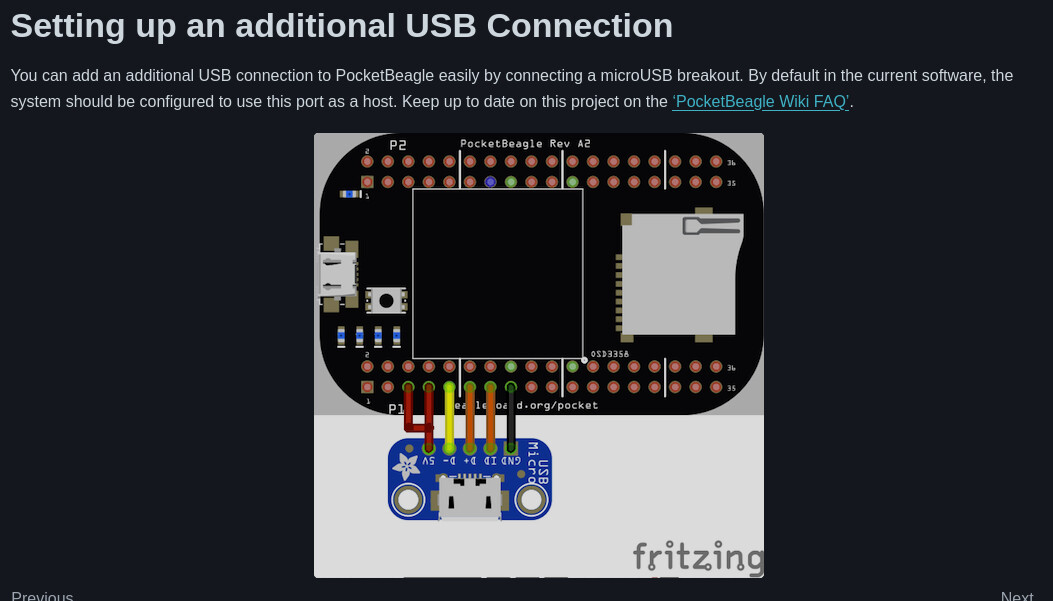
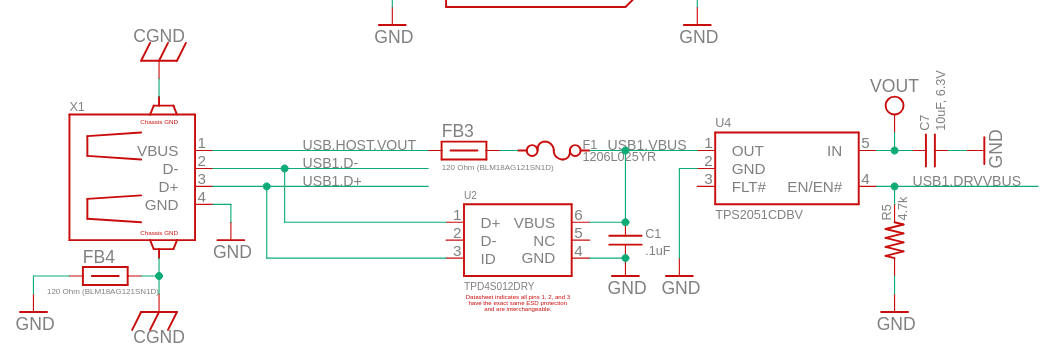
The techlab has a working usb HOST… capes/pocketbeagle/TechLab at main · beagleboard/capes · GitHub
Regards,
Oh, I am using just USB socket without any additional chips. That is the reason, thank you!
These are some adapters we have used in the past
I don’t see any chips on the board, it looks like a micro-USB socket too.
i can’t find their ‘host’ version… i’ve use a OTG adapter with that design before to bring out a host port..
the extra chips are:
- TPD4S012DRY: ±10-kV ESD protection diode for USB Interface
- TPS2051CDBVR USB power switch (to switch the USB-Power on and off)
both are not required in a lab setup..
be careful with ESD while plugging in /out..
you could use one of these…
(links are all pointing to adafruit)