usb0 DHCP server emits Option 3 (Router) host default route hijacked, connectivity lost (2026-07-24, follow-up to #44222)

Following up on #44222. The 2026-07-22 fix correctly enabled the usb0 DHCP server, but that appears to have activated a pre-existing setting in the same file which now affects the host’s routing.

Environment

  • Image: am335x-debian-13.6-base-v6.18-armhf-2026-07-24-4gb
  • /etc/dogtag: BeagleBoard.org Debian Trixie Base Image 2026-07-24
  • Kernel: 6.18.39-bone44
  • Board: BeagleBone Black Rev D, booted from microSD (eMMC untouched)
  • Host: macOS Tahoe 26.5.1, connected over USB only
  • sysconf.txt: only user_name and user_password set. usb_enable_dhcp left commented.

Symptom

With the board attached over USB, the host loses all internet connectivity.

The host’s IPv4 default route is replaced by 192.168.7.2, and the existing route via the Wi-Fi gateway is demoted to interface-scoped. Multicast and broadcast routes move to the USB interface as well. Since the board has no upstream, all internet-bound traffic is blackholed.

Unplugging the board restores connectivity immediately. Reproducible in both directions.

Cause

/etc/systemd/network/usb0.network (from bb-usb-gadgets) contains EmitRouter=yes, so the board’s DHCP Offer includes Option 3 (Router) pointing at itself.

This setting was present before the 07-22 fix, but had no effect because DHCPServer=true was missing and the server never ran. Enabling the server made it live.

Evidence

EmitRouter=yes
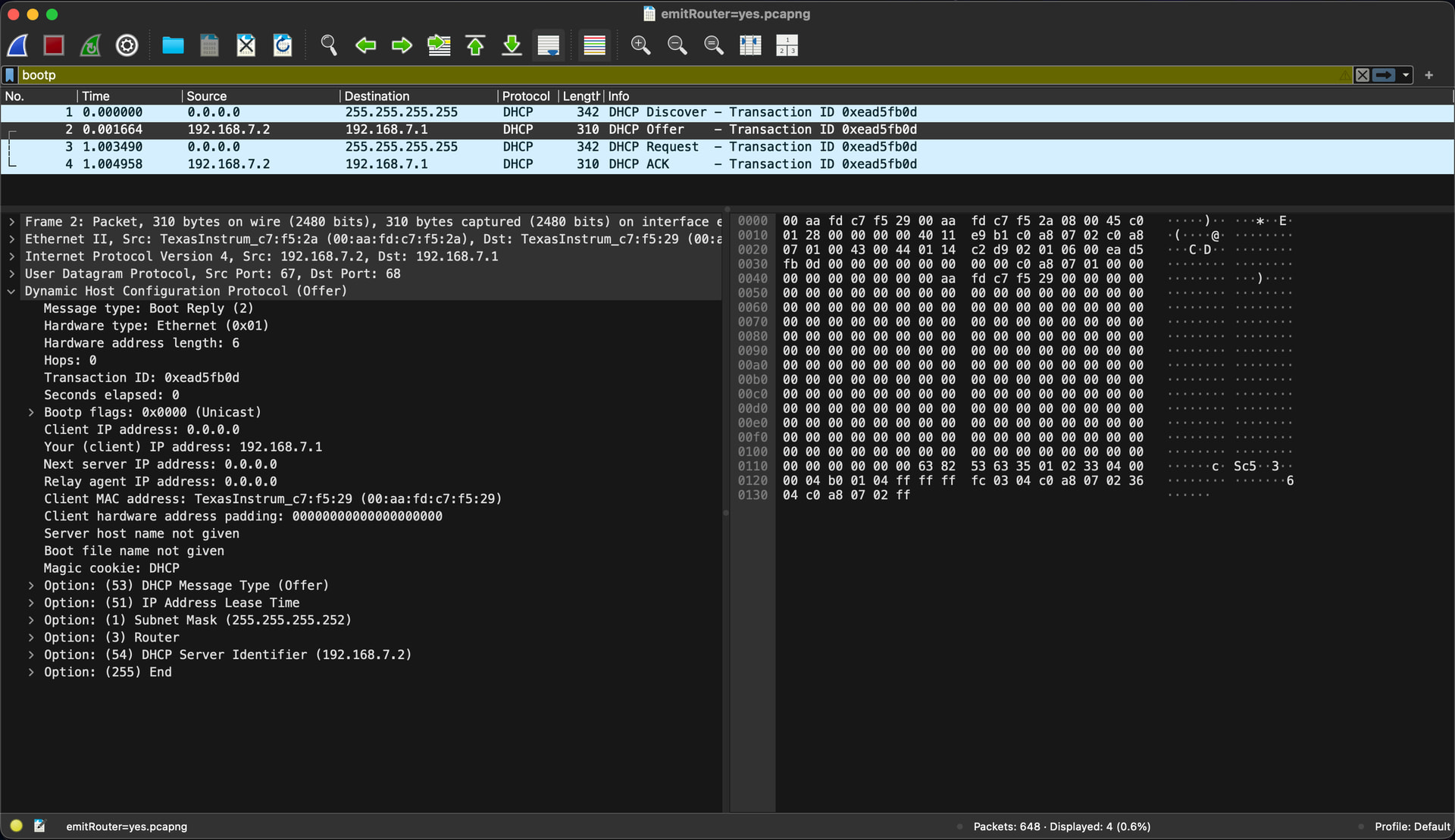
DHCP Offer as shipped, EmitRouter=yes, 310 bytes:

Option: (53) DHCP Message Type (Offer)
Option: (51) IP Address Lease Time
Option: (1)  Subnet Mask (255.255.255.252)
Option: (3)  Router
Option: (54) DHCP Server Identifier (192.168.7.2)
Option: (255) End

EmitRouter=no
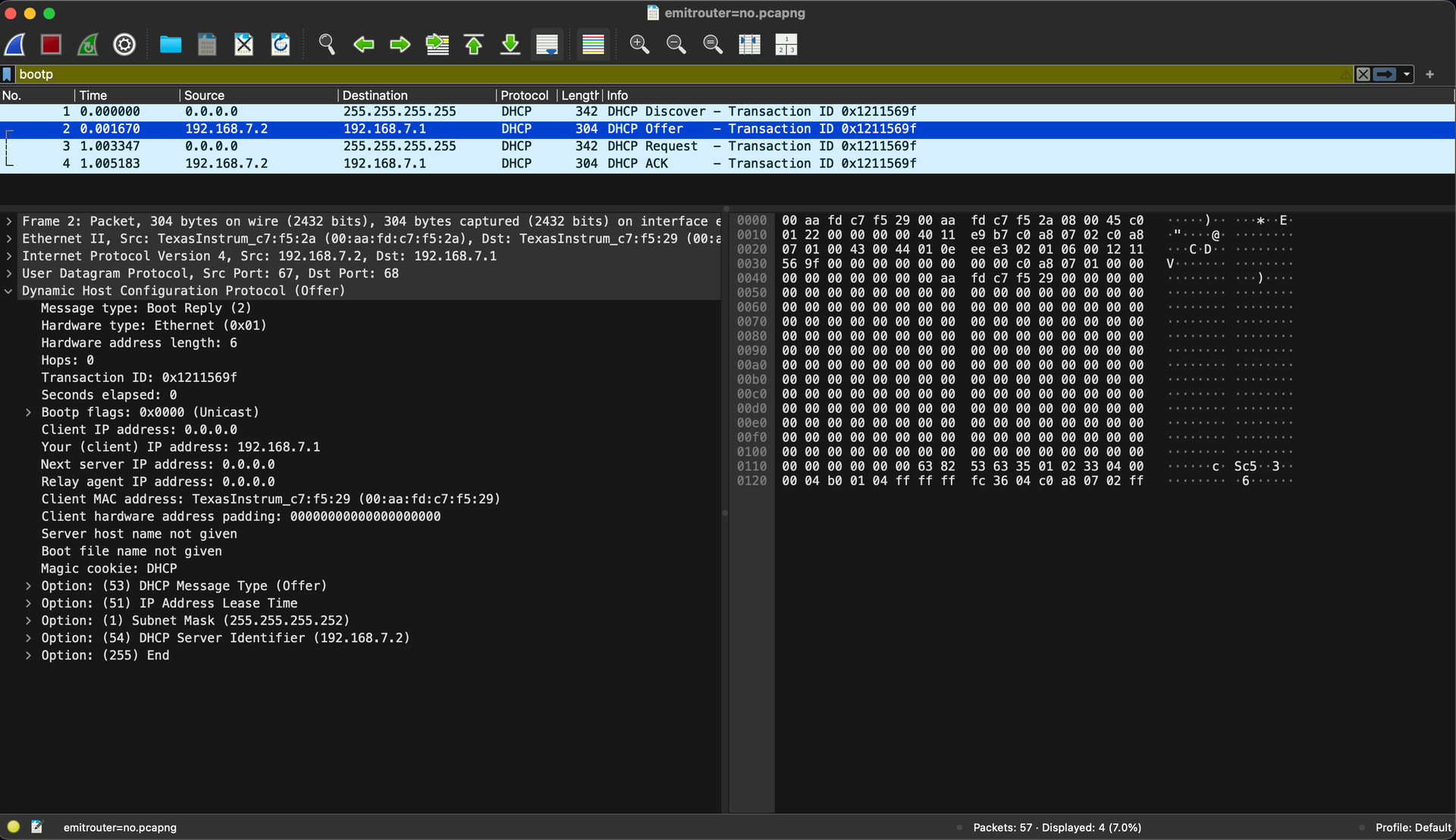
Same exchange with EmitRouter=no, 304 bytes:

Option: (53) DHCP Message Type (Offer)
Option: (51) IP Address Lease Time
Option: (1)  Subnet Mask (255.255.255.252)
Option: (54) DHCP Server Identifier (192.168.7.2)
Option: (255) End

Host routing table with board attached:

default   192.168.1.1    UGScIg   en0     (Wi-Fi, demoted, note the I flag)
default   192.168.7.2    UGScg    en12    (board, primary)

Proposed fix

EmitRouter=no in the [DHCPServer] section of usb0.network.

Tested: Option 3 disappears from the Offer, the host no longer installs a default route via the board, and the board remains fully reachable at 192.168.7.2 over ICMP and SSH. No other DHCP options are affected.

Notes

  • Tested only on macOS. Linux and Windows hosts rank interfaces differently and may not see the same impact. The Linux output in #44222 looks healthy, so this may be host specific.
  • DNS also fails on the affected host, but this is not the board’s doing. EmitDNS=no is set and Option 6 is never sent. macOS appears to create an empty resolver entry when the USB interface becomes primary. Mentioning it only so it isn’t misattributed.
  • The prior image on this board’s eMMC (Bookworm Base Image 2025-05-27) did not exhibit this on the same host.
  • If EmitRouter=yes is intentional for Internet Sharing setups, apologies for the noise. In that case it may be worth gating it behind a sysconf option.

Thank you for testing this.. We need to find a way to add a “usb0” only mode… @ayush1325

RIght now there are 3 usb0 options pre-installed:

debian/usb0-DHCP.network /etc/bbb.io/templates/
debian/usb0-DHCPServer.network /etc/bbb.io/templates/
debian/usb0-only-DHCPServer.network /etc/bbb.io/templates/

The “default”… repos-armhf/bb-usb-gadgets/suite/trixie/debian/usb0-DHCPServer.network at master · beagleboard/repos-armhf · GitHub

Which since the BBB has ethernet we have to assume the ethernet might be plugged in..

Option 2.. is assume no ethernet… that’s where this is used: repos-armhf/bb-usb-gadgets/suite/trixie/debian/usb0-only-DHCPServer.network at master · beagleboard/repos-armhf · GitHub

Option 3 is pure dhcp, so whateever ics set’s up on the host..

Since all 3 of these depend on the end user, we might have to set it up in bb-imager-rs? what do you think @ayush1325

Regards,

Can it be a sysconf item?

Yes the difficulty is on the beagle hardware that only has usb ethernet. That when plugged into a host machine, usual has to make the assumption that host doesn’t supply an up number, so we have to run dhcp server on the beagle. Now when the beagle hardware does have a proper network (so Ethernet or wifi) then on those interfaces the host will typically provide dhcp. But on the usb interface we should still provide dhcp and this leads to making dhcp run ONLY on the usb interface.

Direct routing is clear - the usb should route ip only to its subnet, so typically 192.168.7.1/30. That works regardless of where other interfaces are doing.

So the only problem is default routes. If we have wifi or ethernet, then that should be the default route. Only if we have neither of those should usb be the default route. I thought we could do this by setting several default routes - with a priority flag. So just have wifi and ethernet higher priority than the usb. I’ll see if I can find how to do this - haven’t done it in years …

… ah yes, systemd networkd has a Metric you can add to sections. Which I guess we could apply to the default route. I guess this is set in the [Route] section of the config file. I haven’t tried this myself - but it seems to make sense …

To be honest, I am gravitating toward the view that most of the problems we have
with all of this “automation” is that it is getting so complex, with so many permutations,
that we’re almost certain to break something for someone.

At this point it would almost be better to not do anything at all and just
leave it up to the user to figure out what they want with their board themselves.

I’m sure there will be some gnashing of teeth in the beginning,
but in the end, would it not be better to gently nudge people in the direction
of “I figured out something on my own; yay awesome”, instead of playing
this loosing game of “not exactly right for anyone” ?

@RobertCNelson

Problem is you have to have a very hard nose when digging through systemd and networkd. That scares most people, and with good reason. So to my mind probably should supply something that work for most, and then have example setup file that do the outlier cases which users can start from.

idk, even if we ignore the bb-imager-rs flasher to pre-set these options..

We have 3 setups inside the image, looking for options or docs on how to easy make sure uses can find them and set the two alt modes..

On things like the BBB we have to assume eth0 might be plugged in so usb0 can’t take over the route.. On things like the PB2, we could almost assume usb0 is the route, but some users can plug in a usb eth..

Since we can’t detect this situation, and we get new users all the time.. I really think we need to push this up into bb-imager-rs.. with a selector ..

Default:

  1. eth0 route, usb0 with dhcpserver (default today)
  2. usb0 route full dhcpserver (what user needs)
  3. usb0 ass dhcp, let host os do dhcpserver

idk know what to call it, or do we need an visual image in teh gui… i’m kinda relying on @NagareYash and new users who may have never seen one these boards, what would help you, as a first time user..

What about

[Match]
Name=usb0

[Network]
DNS=8.8.8.8
DHCPServer=true
IPv6PrivacyExtensions=true
IPv6AcceptRA=true

[Address]
Address=192.168.7.18/30

[Route]
Gateway=192.168.7.17
Metric=100

[DHCPServer]
EmitDNS=false
EmitNTP=false
EmitSIP=false
EmitRouter=false

And something similar on ethernet and wifi but with lower metric. Systemd then handles each interface differently - and only one default route should be set to the best option?

The question I pose is:
How many people actually notice the settings then using Imager (if they use it at all)?

I know, I didn’t the first times I used it, and as I said, while some still use Balena,
I for one still find bmaptool more reliable, so anything we add there
could still go completely un-noticed by a lot of people.

Don’t get me wrong when I said what I did; systemd isn’t exactly helping
when it comes to setting up a system, but seeing how we seem to converge
on Debian, perhaps discussing how to do a basic network setup by hand
could go a long way if you ask me.

@DavidSummers: You strike me as someone who have a very firm grasp on the
finer points of setting up Trixie; would this be something you could commit to docs.beagle.cc?

1 Like

Yes I started out using Arm Arch - as the main arch site had very good documentation written up. Alas arm arch has very few people active on the site. So to get things working I slowly learn more, and gave help to people that asked. Arch arm gave up on armv5 a few years ago - so my backup device has been managed by me since then. So I learn more.

Alas now I find my self redundant, and no companies need people that understand physics and maths, the world has moved on. So now most time is looking for a new job, and when not trying to start a business for developing electronics for space cryocoolers. Alas no relevant agency sees a need for electronics for crycoolers - they thing that the mechanical bit is the hard part and so only give money for that - which is sad.

So I probably don’t have time to write up anything at the moment. In the past I did most of whats on Testing to determine if you are a bot!. Sorry about that - I’ll probably just give ideas on solutions …