Hi all,
I’m busy revamping some data reporting devices that we’ve built back in 2018 for reporting RFID tag reads over AX.25 packet radio, adding WiFi dongles to them and setting them up to host a WiFi network so a separate device (a Raspberry Pi Pico2 W based sign) can connect over WiFi. The devices are built on original PocketBeagles (AM3358-based). This is being done for a not-for-profit emergency comms group with a skint budget, buying PocketBeagle 2s is not a practical option.
The image is a Debian 11 image that I’ve dist-upgraded to Debian 13. I will try a stock Debian 13 image if I can find one, but for now I just updated the existing install so that I maintained the existing board configuration.
The plan is for the PocketBeagle to host its own wireless network, so the WiFi interface needs to operate in AP mode. I’ve made a break-out board that brings the USB interface on the PocketBeagle header out to a USB-A socket, and into this I’ve plugged a generic USB WiFi dongle based on the rtl8821cu chipset.
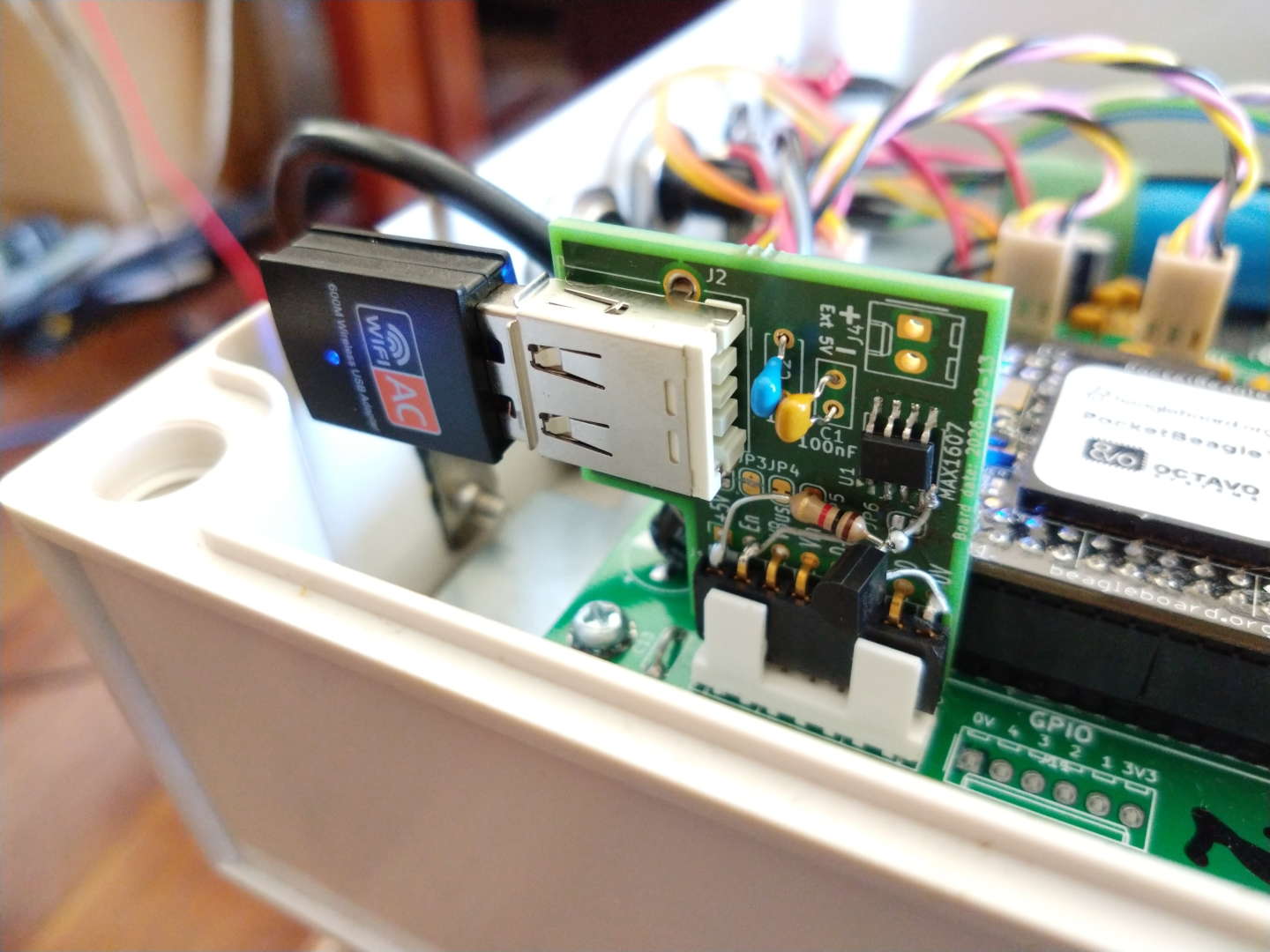
Aside from some fun-and-games with USB_EN being active-high whilst the USB high-side power switch I used being active-low (needing a MOSFET/resistor inverter to be dead-bugged onto the PCB), I have the USB dongle working as a client. The trouble is making it work in AP mode (allegedly supported by the chipset).
root@vk4bwi-12:/home/debian# cat /ID.txt
BeagleBoard.org Debian Bullseye IoT Image 2021-12-12
root@vk4bwi-12:/home/debian# uname -a
Linux vk4bwi-12 5.10.168-ti-r83 #1bullseye SMP PREEMPT Thu Aug 7 20:36:50 UTC 2025 armv7l GNU/Linux
root@vk4bwi-12:/home/debian# lsb_release -a
No LSB modules are available.
Distributor ID: Debian
Description:    Debian GNU/Linux 13 (trixie)
Release:        13
Codename:       trixie
root@vk4bwi-12:/home/debian# iw phy0 info

Wiphy phy0
        wiphy index: 0
        max # scan SSIDs: 4
        max scan IEs length: 2243 bytes
        max # sched scan SSIDs: 0
        max # match sets: 0
        Retry short limit: 7
        Retry long limit: 4
        Coverage class: 0 (up to 0m)
        Device supports T-DLS.
        Supported Ciphers:
                * WEP40 (00-0f-ac:1)
                * WEP104 (00-0f-ac:5)
                * TKIP (00-0f-ac:2)
                * CCMP-128 (00-0f-ac:4)
                * CCMP-256 (00-0f-ac:10)
                * GCMP-128 (00-0f-ac:8)
                * GCMP-256 (00-0f-ac:9)
                * CMAC (00-0f-ac:6)
                * CMAC-256 (00-0f-ac:13)
                * GMAC-128 (00-0f-ac:11)
                * GMAC-256 (00-0f-ac:12)
        Available Antennas: TX 0x1 RX 0x1
        Configured Antennas: TX 0x1 RX 0x1
        Supported interface modes:
                 * IBSS
                 * managed
                 * AP
                 * AP/VLAN
                 * monitor
                 * P2P-client
                 * P2P-GO
The challenge I suspect, is the kernel shipped for these devices is quite old. Kernel 5.10.168. Apparently some fixes went into this driver in kernel 6.9. Right now, getting it into AP mode fails:
[ 1753.206784] rtw_8821cu 2-1:1.0: rtw_usb_reg_sec: reg 0x4e0, usb write 1 fail, status: -71
[ 1753.250473] rtw_8821cu 2-1:1.0: rtw_usb_reg_sec: reg 0x4e0, usb write 1 fail, status: -71
[ 1753.286206] rtw_8821cu 2-1:1.0: rtw_usb_reg_sec: reg 0x4e0, usb write 1 fail, status: -71
[ 1753.330019] rtw_8821cu 2-1:1.0: rtw_usb_reg_sec: reg 0x4e0, usb write 1 fail, status: -71
Also, I note it fails to read the wireless regulatory database, so at the moment it isn’t even running the correct bandplan restrictions for this country (Australia).
Mar 28 00:59:16 vk4bwi-12 kernel: cfg80211: Loading compiled-in X.509 certificates for regulatory database
Mar 28 00:59:16 vk4bwi-12 kernel: cfg80211: Loaded X.509 cert 'sforshee: 00b28ddf47aef9cea7'
Mar 28 00:59:16 vk4bwi-12 kernel: cfg80211: loaded regulatory.db is malformed or signature is missing/invalid
I have a feeling this also relates to the old kernel. I understand last time I looked this up there was an issue with eMMC on the BeagleBoard Black preventing newer kernels being used, however the PocketBeagle does not have eMMC, so this restriction doesn’t apply.
Can someone advise on where I get a newer kernel for this thing? (Or a source tree I can try cross-building?)