I have just installed a Test BBB with Trixie 13.3 v6.18 and am trying to config PRU input output pins. I have the PRU compiler working but this new OS has a new way of working with GPIOs. I have mostly been working with Bookworm 12.2 v5.10. and its way of configuring pins. The device overlays look totally different also. Is there docs somewhere on how to create and compile Device overlays for v6.18?
For compatibly sake, v5.10.x-ti is still available:
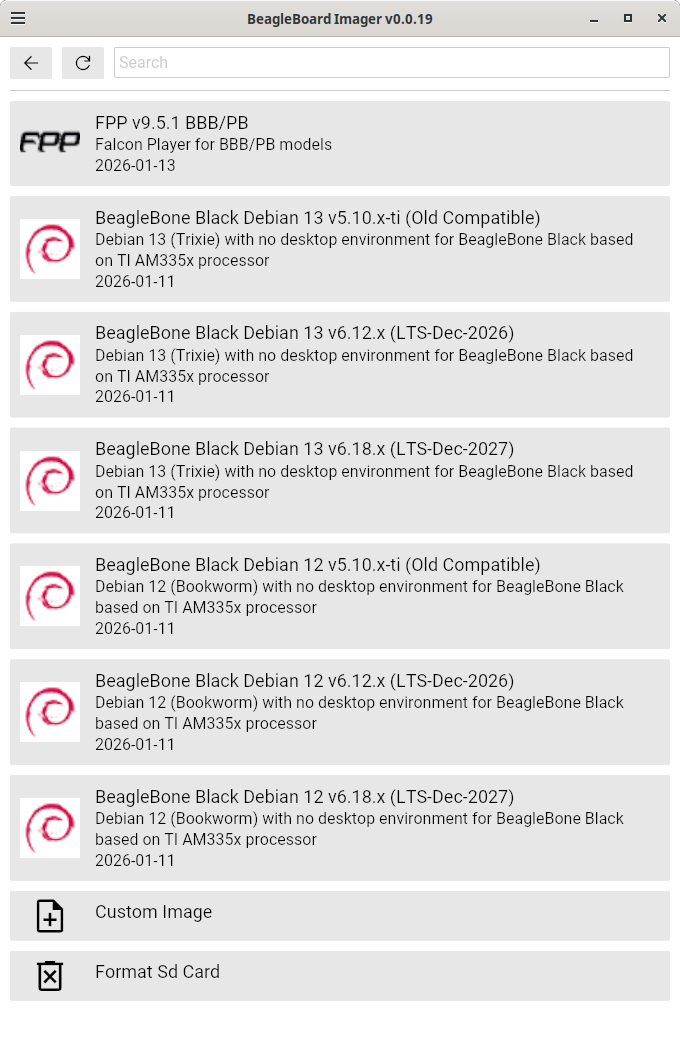
If you want to use v6.18.x with remoteproc_pruss, you’ll need to configure the pins in the overlay..
Regards,
I have used the following overlay with 5.10.168-ti-r83 trixie 13. Where the pruss-core0 toggles P8_12 r30_bit14. The pru app also toggles P8_16 using direct register writes:
Pru Code compiled using Code Composer Studio 12.8.1 and uploaded to the BBB.
void initScopeDebug0(void)
{
GPIO1.DATAOUT_bit.DO_bit14 = 0; // Set Debug pin P8_16 LO
GPIO1.DIR_bit.OE_bit14 = 0; // Set Debug pin P8_16 as output
}
void scopeDebug0(int periodUs)
{
int i, count;
count = periodUs/2 ;
GPIO1.DATAOUT_bit.DO_bit14 = 1; // Debug signal P8_16 HI to scope if required
for(i=0; i<count; i++)
__delay_cycles(1SCOPE_DEBUG_FREQ);
GPIO1.DATAOUT_bit.DO_bit14 = 0; // Debug signal P8_16 LO to scope if required
for(i=0; i<count; i++)
__delay_cycles(1SCOPE_DEBUG_FREQ);
}
MOTOR-CTL-00A0.dts
// SPDX-License-Identifier: GPL-2.0-only
/*
- Copyright (C) 2015 Texas Instruments Incorporated - https://www.ti.com/
*/
/dts-v1/;
/plugin/;
/*
- Helper to show loaded overlays under: /proc/device-tree/chosen/overlays/
*/
&{/chosen} {
overlays {
MOTOR-CTL-00A0.kernel = TIMESTAMP;
};
};
/*
-
Free up the pins used by the cape from the pinmux helpers.
*/
&ocp {
P8_11_pinmux { status = “disabled”; }; // P8_11
P8_12_pinmux { status = “disabled”; }; // P8_12
P8_35_pinmux { status = “disabled”; }; // P8_35 [lcd d12]
P8_33_pinmux { status = “disabled”; }; // P8_33 [lcd d13]
P9_42_pinmux { status = “disabled”; }; // P9_42A [ecappwm0]
};
&am33xx_pinmux {
pru_cape_bone_pins: pru_cape_bone_pins {
pinctrl-single,pins = <
0x034 0x06 // P9_11: pruout bit15
0x030 0x06 // P8_12: pruout bit14
0x0d0 0x02 // P8_35: eqep1A
0x0d4 0x02 // P8_33: eqep1b
0x164 0x03 // P9_42: apwmo pruout;
};
};
&pruss_tm {
status = “okay”;
};
&pruss {
status = “okay”;
pinctrl-names = “default”;
pinctrl-0 = <&pru_cape_bone_pins>;
};
/*
- The following PRU options are just the default, but added heare for end users to modify.
*/
&pru0 {
firmware-name = “am335x-pru0-fw”;
};
&pru1 {
firmware-name = “am335x-pru1-fw”;
};
&pruss_uart {
status = “disabled”;
};
&pruss_mdio {
status = “disabled”;
};
I have this working ok on v5 bookworm kernel but am trying to test out v6.18 trixie
I used the Makefile from the git BeagleBoard-DeviceTrees repository to build an v6.18 dtbo file but I cannot get the pru output pins to work . Here is my overlay file which I am probably missing something important in.
/*
- Configure PRU i/o pins
*/
/dts-v1/;
/plugin/;
#include <dt-bindings/gpio/gpio.h>
#include <dt-bindings/pinctrl/am33xx.h>
/*
- Helper to show loaded overlays under: /proc/device-tree/chosen/overlays/
*/
&{/chosen} {
overlays {
BB-PRU-PIN2-CONFIG.kernel = TIMESTAMP;
};
};
/*
- Free up the pins used by the cape from the pinmux helpers.
/
&ocp {
P8_42_pinmux { status = “disabled”; }; / lcd_data5 /
P9_27_pinmux { status = “disabled”; }; / mcasp0_fsr */
};
&am33xx_pinmux {
bb_pru_pins: pinmux_bb_pru_pins {
pinctrl-single,pins = <
AM33XX_PADCONF(AM335X_PIN_LCD_DATA5, PIN_OUTPUT_PULLDOWN , MUX_MODE5) /* P8_42 PRU1 pr1_pru1_pru_r30_5 output /
AM33XX_PADCONF(AM335X_PIN_MCASP0_FSR, PIN_OUTPUT_PULLDOWN , MUX_MODE5) / P9_27 PRU0 pr1_pru0_pru_r30_5 output */
;
};
};
&{/} {
prusetup {
status = “okay”;
pinctrl-names = “default”;
pinctrl-0 = <&bb_pru_pins>;
};
};
The overlay compiles without error and appears to load on boot but I cannot get the PRUs to output any signal.
$ beagle-version
eeprom:[A335BNLTEIA04218BBBK24ED]
model:[TI_AM335x_BeagleBone_Black]
dogtag:[BeagleBoard.org Debian Trixie Base Image 2026-01-11]
bootloader:[eMMC-(default)]:[/dev/mmcblk1]:[U-Boot SPL 2022.04-g35cf2942 (Dec 31 2025 - 00:30:32 +0000)]:[location: dd MBR]
UBOOT: Booted Device-Tree:[am335x-boneblack-uboot.dts]
UBOOT: Loaded Overlay:[BB-ADC-00A0.kernel]
UBOOT: Loaded Overlay:[BB-BONE-eMMC1-01-00A0.kernel]
UBOOT: Loaded Overlay:[BB-I2C1-RTC-DS3231.kernel]
UBOOT: Loaded Overlay:[BB-PRU-PIN2-CONFIG.kernel]
kernel:[6.18.6-bone16]
/boot/uEnv.txt Settings:
uboot_overlay_options:[enable_uboot_overlays=1]
uboot_overlay_options:[uboot_overlay_addr4=BB-I2C1-RTC-DS3231.dtbo]
uboot_overlay_options:[uboot_overlay_addr5=BB-PRU-PIN2-CONFIG.dtbo]
uboot_overlay_options:[disable_uboot_overlay_video=1]
uboot_overlay_options:[disable_uboot_overlay_audio=1]
uboot_overlay_options:[uboot_overlay_pru=AM335X-PRU-UIO-00A0.dtbo]
pkg check: to individually upgrade run: [sudo apt install --only-upgrade ]
pkg:[bb-customizations]:[1.20250808.0-0~trixie+20250808]
pkg:[bb-usb-gadgets]:[1.20250523.1-0~trixie+20250527]
pkg:[bb-wl18xx-firmware]:[1.20230703.0-0~trixie+20240703]
pkg:[kmod]:[34.2-2bbbio1~trixie+20250522]
Since I am runing Trixie with 5.10 Device Trees and my overlay works, the next step will to be to try 6.18 same as you. Will need to check some of the node references first.
1 Like
I have my PRU pin config device overlay working now for trixie v6.18 now that I fixed my errors and added the correct &pruss and &pruss_tm setup thanks to klindsayr MOTOR-CTL-00A0 example.
I have working outputs now on both PRUs
BB-PRU-PIN2-CONFIG.txt (936 Bytes)
Switched to v6.18 using the same overlay as for 5.10 and I am getting the error:
uboot_overlays: unable to find [mmc 1:1 MOTOR-CTL-00A0.dtbo]…
Trys to start the kernel then fails with “mGave up waiting for root file system device.”
This is a segment of my /boot/uEnv.txt file
#Docs: Making sure you're not a bot!
uname_r=6.18.6-bone16
#uuid=
#dtb=
###U-Boot Overlays###
###Documentation: Making sure you're not a bot!
###Master Enable
enable_uboot_overlays=1
###Overide capes with eeprom
#uboot_overlay_addr0=.dtbo
#uboot_overlay_addr1=.dtbo
#uboot_overlay_addr2=.dtbo
#uboot_overlay_addr3=.dtbo
###Additional custom capes
uboot_overlay_addr4=MOTOR-CTL-00A0.dtbo
#uboot_overlay_addr5=.dtbo
#uboot_overlay_addr6=.dtbo
#uboot_overlay_addr7=.dtbo
You probably have to update the dts files to the newer format for v6 dtso overlays
I attempted to rewrite your file dts file into dtso format and you will have to build it with the 6.18 compiler.
I compiled the dtso files for v6.18.6 by using the git package BeagleBoard-DeviceTrees
Here is the procedure I used.
Download BeagleBoard-DeviceTrees git repository
git clone GitHub - beagleboard/BeagleBoard-DeviceTrees
cd BeagleBoard-DeviceTrees
Copy your dtso file to the overlay build dir
cp MOTOR-CTL-V6.dtso src/arm/overlays
Compile a single overlay
make src/arm/overlays/MOTOR-CTL-V6.dtbo
Then copy the dtbo file to overlays
cp src/arm/overlays/MOTOR-CTL-V6.dtbo /boot/dtbs/6.18.6-bone16/overlays
Update /boot/uEnv.txt
uboot_overlay_addr4=MOTOR-CTL-V6.dtbo
Reboot and test
MOTOR-CTL-V6.dtso.txt (1.3 KB)
Another version without the fancy defines
MOTOR-CTL-V6B.dtso.txt (1.1 KB)
1 Like
One question does your uEnv.txt file reference this, “uname_r=6.18.6-bone16”? I was all happy with my first attempt to just discover I was still using 5.10.
Thanks for the procedure you recommended I will give it a shot this afternoon. Can you shoot me a copy of uEnv.txt file? Also what is the full path to the overlays after the rebuild?
The main reason I want to use Trixie and debian 13 is because of my CCS 12.8.1 and Eclipse as a linux cross compiler all runing on Ubuntu 24.04.
Thanks got it working going to try both versions you gave me then off to getting EQEP1 and APWMO to work from the pru0 and messaging to work from pru1.
Here is my uEnv.txt it is just the standard trixie 13.3 v6.18 installed file with some added overlays.
It appears the system active loadable overlays are kept in kernel version specific directories
/boot/dtbs/6.18.6-bone16/overlays
Now I need to figure out how to use the new gpiodlib code. Controlling gpio pins is going to take some rethinking as you can no longer just permanently set gpio inputs and outputs. Looks like you have to have permenantly running daemonized processes controllers to guarantee consistency and access.
uEnv.txt (2.0 KB)
Your uEnv.txt is the same except for the overlays used.
For what is is worth I have written a c++ class for libgpiod v2.2 that class is used by a BBB app for linux. This is a link to my github
Not been tested with 6.18.x also not sure about this but can’t read back values when the direction is set to OUTPUT. The testing is done through “main.cpp”.
Thanks I will take allok at your libgpiod code.
Also it appears you should place your overlays somewhere else probably /lib/firmware
When the kernel gets upgraded they will not be preserved into the new version overlay dir.
I just upgraded to v6.18.7-bone17 and lost my overlay loading.
#Copy the dtbo file to /lib/firmware
cp src/arm/overlays/MOTOR-CTL-V6.dtbo /lib/firmware
#Update /boot/uEnv.txt
uboot_overlay_addr4=/lib/firmware/MOTOR-CTL-V6.dtbo
I save the source code on my PC. Then I download it into my /opt/source/dtb-6.18.x/src/arm/overlays folder. Then if the script found in /opt/source/dtb-xxxxx/build_n_install.sh sould install it in the proper /boot/dtbs/6.18.6-bone16 folder in my version.
I am going to check this out with the current version by moving my MOTOR-CTL-V6.dtso to the:
/opt/source/dtb-6.18.x/src/arm/overlays folder
Did the following
$ cd /opt/source/dtb-6.18.x
$ sudo git pull
Uploaded the MOTOR-CTL-V6.dtso to the /opt/source/dtb-6.18.x/src/arm/overlays. Then
$ sudo ./build_n_install.sh
$ sudo reboot
Everything works OK overlay loaded properly. Checked the /sys/devicetree
$ ls /sys/firmware/devicetree/base/chosen/overlays
MOTOR-CTL-V6.kernel
PRU0 loads and runs as expected.
Thanks for the help.
Have you tried the PRU_RPMsg_Echo_Interrupt0 from the ti/pru_software_support_package/examples?
I am getting this error with kernel 6.18.6:
8284.283659] remoteproc remoteproc1: powering up 4a334000.pru
[ 8284.291533] remoteproc remoteproc1: Booting fw image apwm-pru0, size 92096
[ 8284.303172] rproc-virtio rproc-virtio.2.auto: .kick method not defined for 4a334000.pru
[ 8284.321996] remoteproc remoteproc1: failed to probe subdevices for 4a334000.pru: -22
[ 8284.337979] remoteproc remoteproc1: Boot failed: -22
I’m trying to get my Beaglebone Black Rev C to toggle P9_27, and I haven’t been able to get it to work. I followed the instructions above and got the 06io example to build and run from the pru-cookbook-code. My code is quite short:
// This code accesses GPIO without using R30 and R31
#include <stdint.h>
#include <pru_cfg.h>
#include "resource_table_empty.h"
#include "prugpio.h"

volatile register uint32_t __R30;
volatile register uint32_t __R31;

void main(void)
{
        uint32_t *gpio = (uint32_t *)GPIO3;

        while(1) {
                gpio[GPIO_SETDATAOUT]   = P9_27;
                __delay_cycles(100000000);
                gpio[GPIO_CLEARDATAOUT] = P9_27;
                __delay_cycles(100000000);
        }
}
My other thread is here: pru coding and Debian 13 It seems almost like linux isn’t configuring the mode correctly, but I’m not sure how to lookup the mode for the pin in the 6.19. The old pin-config tools don’t work.
Isn’t there supposed to be an OCP bridge enable command in there,
before the PRUs are able to reach out beyond their confines?
Would that require something like: CT_CFG.SYSCFG_bit.STANDBY_INIT = 0;?
The example I used didn’t have that, but I did find a reference to some OCP stuff.
This is what ChatGPT generated for me, so it’s plausible (likely even):
#include <stdint.h>
#include <pru_cfg.h>

volatile register uint32_t __R30;
volatile register uint32_t __R31;

#define GPIO3_BASE 0x481AE000

#define GPIO_OE         0x134
#define GPIO_SETDATAOUT 0x194
#define GPIO_CLEARDATAOUT 0x190

void main(void)
{
    // Enable OCP master port
    CT_CFG.SYSCFG_bit.STANDBY_INIT = 0;

    volatile uint32_t *gpio3_oe = (uint32_t *)(GPIO3_BASE + GPIO_OE);
    volatile uint32_t *gpio3_set = (uint32_t *)(GPIO3_BASE + GPIO_SETDATAOUT);
    volatile uint32_t *gpio3_clr = (uint32_t *)(GPIO3_BASE + GPIO_CLEARDATAOUT);

    uint32_t pin = (1 << 21); // GPIO3_21

    // Set as output (clear bit in OE register)
    *gpio3_oe &= ~pin;

    while (1) {
        *gpio3_set = pin;   // set high
        __delay_cycles(100000000);

        *gpio3_clr = pin;   // set low
        __delay_cycles(100000000);
    }
}